
Remove or transfer a subscription
Remove a subscription from your ESET PROTECT Hub account
|
•Only a superuser or users with write access can remove a subscription. •If you remove the last active cloud-eligible subscription, the affected ESET PROTECT Platform modules will be suspended for 30 days and become inaccessible. You can restore your suspended modules during the 30-day period by adding a new cloud-eligible subscription to your ESET PROTECT Hub account. After 30 days, the modules and all associated data will be deleted. Solutions activated by the subscription will no longer receive updates. |

|
If you intend to transfer the removed subscription from one ESET PROTECT Hub account to another, ensure you copy the subscription activation key before removing the subscription. You can view and copy the activation key in the Overview tab of subscription details after you authenticate with your ESET PROTECT Hub password. |

To remove a subscription from your ESET PROTECT Hub account:
1.Navigate to the Subscriptions section.
2.Click the three dots  icon next to the desired subscription and select Remove subscription. Alternatively, select the check box next to the subscription and click the Actions button > Remove subscription.
3.To leave the activated solutions on your assets intact, do not select the Release all active subscription units and deactivate associated solutions check box. If you select the check box, all active subscription units will be released, and the associated ESET solutions will be deactivated.
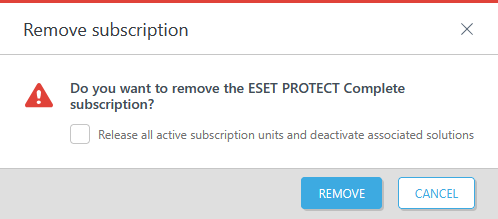
4.Click Remove.
Transfer a subscription to another ESET PROTECT Hub account
Each subscription can be linked to only one ESET PROTECT Hub account at a time. Before transferring a subscription, copy the subscription activation key and remove the subscription from the account to which it is currently assigned.
To transfer a subscription:
1.Log in to the destination ESET PROTECT Hub account.
2.Navigate to the Subscriptions section.
3.Click Add subscription.
4.Type the activation key and click Add subscription.
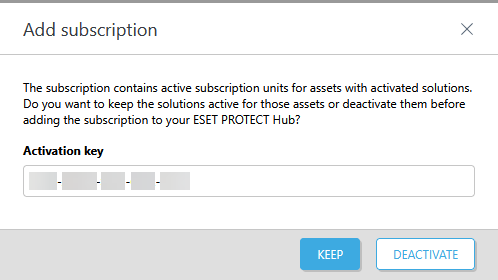
5.If the subscription contains active subscription units for assets with activated solutions, another Add subscription window will appear. Click Keep to keep the solutions active for your assets, or click Deactivate to deactivate the solutions before adding the subscription to the ESET PROTECT Hub account.
|
If you registered the subscription with a different email address than your ESET PROTECT Hub user account, you will receive a verification link at that email address. Verify your email by clicking the verification link and type your ESET PROTECT Hub login credentials. The verification link is valid for 48 hours. |