
Permissions
To set or change user permissions:
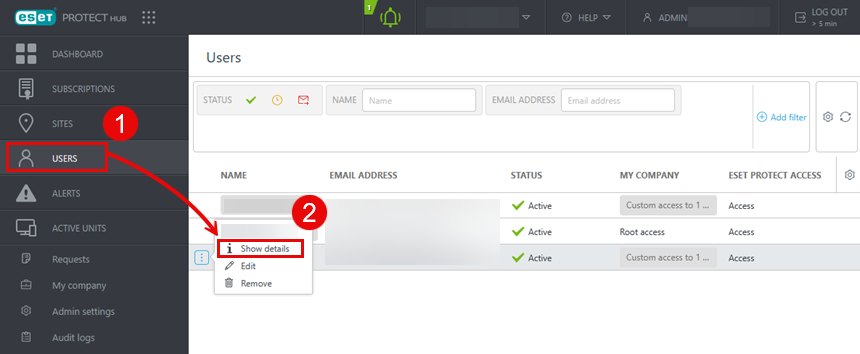
1.Click Users.
2.Select the appropriate user and select Show details.
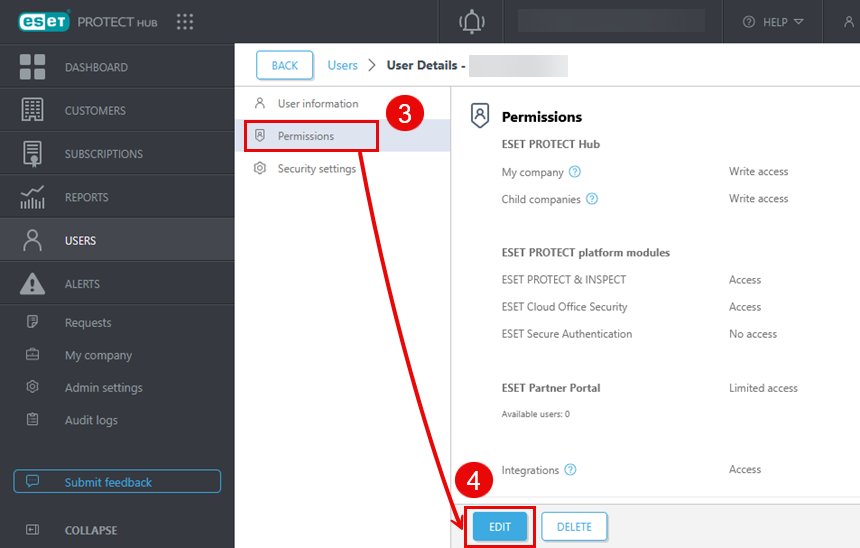
3.Click Permissions.
4.To change permissions, click Edit.
5.Click the Permissions tab.
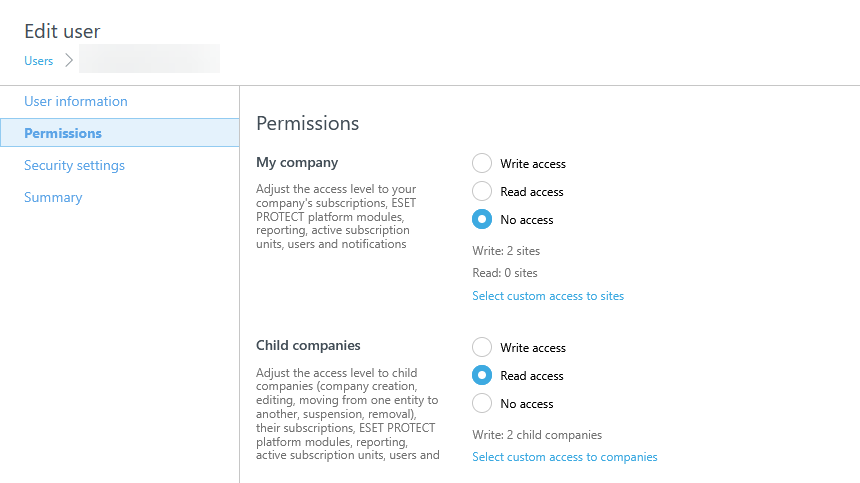
Permissions
You can select from the following options:
•Write—The user can manage all the other users.
•Read—The user can view the data.
•No access—The user cannot view any company information. The user can view only information related to the sites they are associated with.
My company
You can manage access to your company's subscriptions, ESET PROTECT Platform modules, reporting, activate subscription units, users and notifications. Below My company, you can configure access permissions for multiple sites as Write, Read and No access. Click Select custom access to sites to adjust the access level per individual site.
ESET PROTECT Platform modules
You can manage access for the following ESET PROTECT Platform modules:
•ESET PROTECT & INSPECT
•ESET Cloud Office Security
•ESET Secure Authentication
For ESET PROTECT & INSPECT, you can select from the following permissions:
•Access—Users can access the ESET PROTECT Platform module and see all the collected data.
•No Access—Users cannot access the ESET PROTECT Platform module.
•Custom—Users must set access directly in ESET PROTECT and ESET Inspect.
For enabling or disabling ESET Cloud Office Security and ESET Secure Authentication, click the toggle next to your solution.
Integrations
The Integrations toggle enables users to use the available public API via ESET Connect. Only a superuser or user with write access can enable integrations. By enabling Integrations, any data you transmit leaves ESET's secure infrastructure and proceeds to external systems or networks.
|
ESET cannot guarantee the security or confidentiality of the transmitted data and is not responsible for any unauthorized access, disclosure, loss, damage, or misuse of the data. It is the user's responsibility to implement appropriate security measures to protect the transmitted data and to ensure its security and confidentiality when it leaves ESET's infrastructure. |

|
Dedicated API user We recommend creating a dedicated API user in your ESET PROTECT Hub to separate your regular account from ESET Connect activities. |
