
Free trial subscription
A free trial subscription grants you full access to the ESET PROTECT Hub Platform. Self-managed customers can generate the ESET PROTECT Advanced trial subscription directly in ESET PROTECT Hub and try ESET solutions on up to 25 devices for 30 days.
Solutions available in the free ESET PROTECT Advanced trial subscription:
•ESET PROTECT Advanced
•ESET AI Security for ESET PROTECT Advanced
•ESET Endpoint & Server Security for ESET PROTECT Advanced
•ESET LiveGuard Advanced for Endpoint Security + Server Security
•ESET Full Disk Encryption
•ESET Mobile Threat Defense
Generate a trial subscription
You can generate a trial subscription only if you have no active full subscriptions added to your ESET PROTECT Hub account.
You can generate the free trial subscription from:
•The Welcome to ESET PROTECT Hub window > click Try ESET PROTECT Advanced for FREE.
•The Subscriptions section > click Start free trial.
•The Welcome tile > click Generate an ESET PROTECT Advanced FREE trial subscription.
Generating a trial subscription may take a few minutes. You will receive an email with activation information.
When the subscription is ready for use, you can view its subscription details and perform actions in the Subscriptions section.
|
The Increase subscription capacity feature is not available for trial subscriptions. |

Get started with ESET protection
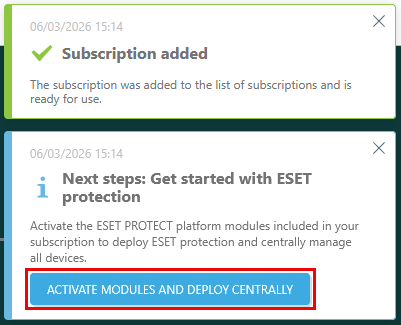
1.After you add a subscription or generate a trial subscription for ESET PROTECT Advanced, a notification Next steps: Get started with ESET protection will appear in the screen corner. Click Activate modules and deploy centrally to activate the ESET PROTECT Platform modules included in your subscription.
2.The module activation wizard will display. In Select the modules you want to activate, select the check box next to each module you want to activate. Click Learn more on the module bar to access the module's Online Help. To activate all modules within the added subscription, select the check box next to Select all. Click Continue.
3.In Select a data center to activate modules, ESET PROTECT Hub selects the recommended remote data center for you by default. To shorten the setup process of future ESET PROTECT Platform module activations, select the check box next to Remember selected data center for future ESET PROTECT platform module activations.
|
•Choosing a non-recommended data center can affect the quality of service. •You cannot change the data center's location after the module activation. |

4.In the Select language section, you can select a language for the activated platform modules. By default, the language you have selected as your ESET PROTECT Hub account language is pre-selected for the platform modules. If your ESET PROTECT Hub language is not available for the platform modules, English is pre-selected by default. To change the pre-selected language, select a language from the language drop-down menu for each platform module.
5.Review your selections and click Activate to activate ESET PROTECT Platform modules.
Trial subscription validity
ESET PROTECT Advanced trial subscription is valid for 30 days. You can verify the validity of trial subscriptions in the subscription details. To filter out trial subscriptions, apply the Subscription type filter and select Trial.
ESET PROTECT Hub will send an alert 14 days before the subscription expiry, and the subscription status will change to Close to expiration in Subscriptions. When the subscription expires, ESET PROTECT Hub will send an alert, and the subscription status will update to Expired in Subscriptions.
|
Last active cloud-eligible subscription If the expired trial subscription is the last active cloud-eligible subscription, the affected ESET PROTECT Platform modules will be suspended for 30 days and become inaccessible. You can restore your suspended modules during the 30-day period by adding a new cloud-eligible subscription to your ESET PROTECT Hub account. After 30 days, the modules and all associated data will be deleted. Solutions activated by the subscription will no longer receive updates. |
Convert a trial subscription to a full subscription
Trial subscriptions cannot be converted to full subscriptions directly in ESET PROTECT Hub. To convert your subscription, refer to your trial subscription confirmation email or contact your reseller.