
Hierarchy roles in ESET PROTECT Hub
ESET PROTECT Hub has different features and access levels based on your hierarchy role. Access to features and visibility within ESET PROTECT Hub depends on the user's hierarchy role. Each role represents the entity in the ESET business ecosystem and determines the entity's scope of actions.
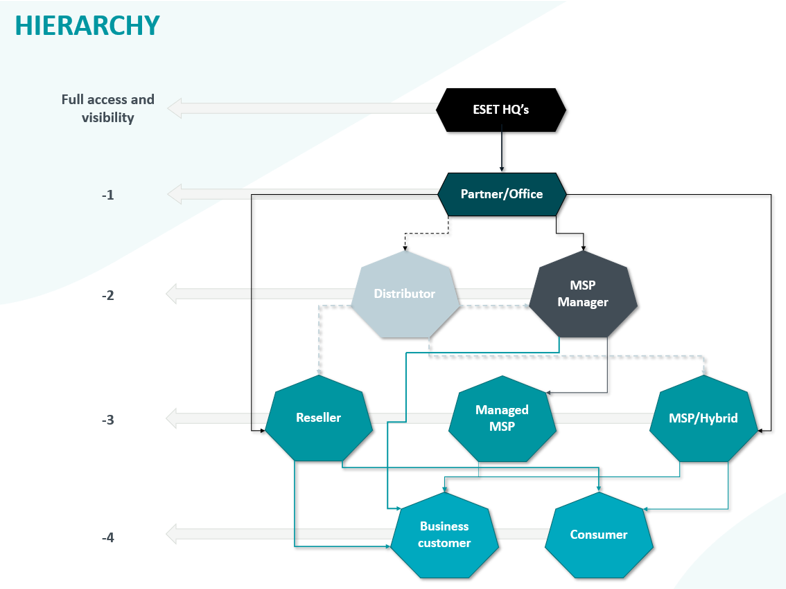
Business customer
Business customers use ESET PROTECT Hub to manage their subscriptions, users and ESET solutions. ESET PROTECT Hub fully replaces the ESET Business Account for business customers and introduces certain additional features.
•Subscription management—You can manage your subscriptions, activate solutions for assets by allocating subscription units and create sites to distinguish between locations. Individual administrators can be created and assigned to sites. Administrators have access rights limited to specific sites (site administrator).
•User management—The Superuser can create new users and assign them appropriate access rights. Administrators must have at least Write access.
•Co-management—Co-management is a collaboration between a reseller/MSP and a customer, where the reseller gets access to the customer's ESET PROTECT Hub account and their security solutions.
There are different types of business customers:
•Self-managed business customer—Customer operates and manages security independently.
•Co-managed business customer—A self-managed customer who grants security management rights to a designated reseller. In co-management, both parties can access the customer's ESET PROTECT Hub and other linked ESET PROTECT Platform modules.
•Managed business customer—A superior hierarchy role fully manages the customer. The customer is integrated into the reseller's infrastructure.
Reseller
The reseller role sells ESET solutions and supports their business customers. Resellers have management capacities for self-managed and co-managed customers but not for managed business customers. Additional features:
•Subscription management—You can manage your subscriptions, activate solutions for assets by allocating subscription units and create sites to distinguish between locations. Individual administrators can be created and assigned to sites. Administrators have access rights limited to specific sites (site administrator). In addition, you have an overview of all the subscriptions the reseller has sold.
•User management—The Superuser can create new users and assign them appropriate access rights. Administrators must have at least Write access. For resellers or MSPs operating in Salesforce markets, three users per reseller can access the ESET Partner Portal.
•My company—You can manage your organization's security using ESET solutions from a single reseller account.
•Co-management—Co-management is a collaboration between a reseller/MSP and a customer, where the reseller gets access to the customer's ESET PROTECT Hub account and their security solutions. Resellers can also collaborate with registered customers who have not purchased solutions.
|
A reseller can collaborate with multiple distributors and partners. Resellers can also operate across various countries without restrictions. |

Managed MSP
Managed MSP is a role managed by an MSP manager. Within the MSP manager framework, we categorize relationships as Trusted or Untrusted based on the configurations established by the MSP manager.
•Trusted managed MSP—Trusted managed MSPs can manage subscriptions and create customers without approval from a superior entity. Their features match the regular MSP role.
•Untrusted managed MSP—Untrusted managed MSPs cannot place orders and perform subscription operations without approval from a superior entity, but can still create and manage MSP customers.
MSP/Hybrid reseller
The MSP role in ESET PROTECT Hub represents a managed service provider with full control over customer management, subscription operations and ESET PROTECT Platform modules deployment. The MSP role is also referred to as a hybrid reseller in markets where standard resellers combine responsibilities with managed services. Additional features:
•Subscription management—You can manage your subscriptions, activate solutions for assets by allocating subscription units and create sites to distinguish between locations. Individual administrators can be created and assigned to sites. Administrators have access rights limited to specific sites (site administrator). In addition, you can see all the subscriptions sold to customers and the entire business history with ESET. You can also manage your customer portfolio.
•User management—The Superuser can create new users and assign them appropriate access rights. Administrators must have at least Write access. You can create unlimited number of users. For resellers or MSPs operating in Salesforce markets, three users per reseller can access the ESET Partner Portal.
•Co-management—Co-management is a collaboration between a reseller/MSP and a customer, where the reseller gets access to the customer's ESET PROTECT Hub account and their security solutions.
•Full management—You can claim full access to the customer's security solutions using the MSP model. The MSP remains the owner of the subscription. All MSPs have the same access rights as hybrid resellers.
|
In the MSP distribution channel, each MSP can have a relationship with one superior entity, granting that entity exclusive rights to sell the MSP's offerings. |
MSP manager
The MSP manager role fully supports and maintains managed MSPs and, optionally, directly managed business customers who do not have their own registered ESET PROTECT Hub account. The MSP manager is also authorized to order MSP subscriptions for managed business customers associated with their managed MSPs. There are two types of MSP managers:
•Trusted MSP manager—Trusted MSP managers can create and edit managed MSPs without approval from a superior entity.
•Untrusted MSP manager—Untrusted MSP managers cannot create or edit managed MSPs directly, but must request the creation of managed MSPs from a superior entity.
Distributor
The distributor role has a broad view of the distribution network and can manage or request the creation of MSPs and MSP managers. Distributors have the same functionality as MSP managers with some additional features, depending on the distributor type:
•Trusted distributor—Trusted distributors can create MSPs without approval from a superior entity, but must request the creation of MSP managers from ESET HQ.
•Untrusted distributor—Untrusted distributors cannot create MSPs directly, but must request the creation of both MSPs and MSP managers from a superior entity.
Partner/Office
The partner role is a regional representative or larger entity managing a broader channel, including distributors and resellers. Partners have a comprehensive overview of all subscriptions sold to customers within their distribution channel.
There are two types of partners:
•Partner—Integrated with Salesforce—Single sign-on directly to Salesforce.
•Partner—Not integrated with Salesforce—Redirection to the partner's CRM (customer relationship management) system.
ESET Headquarters (HQ)
ESET Headquarters is the highest authority in the ESET PROTECT Hub hierarchy. It holds exclusive power to approve any request, sets the strategic direction, maintains quality and compliance and serves as the final decision-maker within the system.