
Log in to ESET PROTECT Hub
To access ESET PROTECT Hub, open the login page.
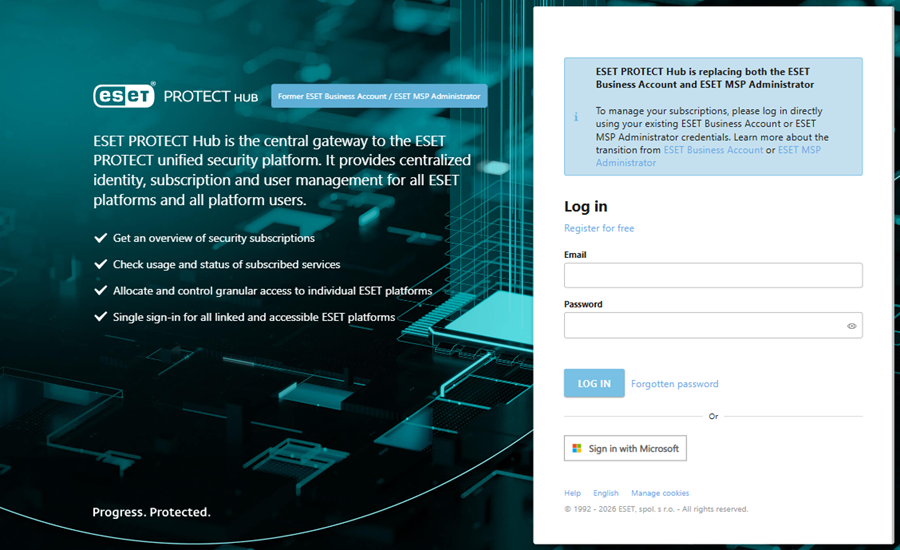
If you do not have an ESET PROTECT Hub account, click Register for free to create a new account.
You have two login options:
•If you have an ESET PROTECT Hub account, type your Email and Password and click Log in. Click Forgotten password to recover your account password. If using Two-Factor Authentication, ESET PROTECT Hub will prompt you to type a One-time Password generated by your authentication app to complete the login.
•If you are a self-managed or co-managed customer and the single sign-on with Microsoft Entra ID is configured, click Sign in with Microsoft to log into ESET PROTECT Hub with your Microsoft account.
Click Help to open the Online Help.
To change the login page language, click the language link and select the preferred language in the language selector.
|
The selected language applies only to the login page. You can change the language of ESET PROTECT Hub in your profile. |

The Manage cookies link enables you to review cookie details, adjust their preferences, and access the Cookie Policy for more information.
|
•For questions related to login to ESET PROTECT Hub, refer to the FAQ section Access & Login. •You can view the latest changelog for the ESET PROTECT Hub login page in Release notes for login page. |