Add a subscription
Navigate to the Subscriptions section. If you have not added a subscription to your ESET PROTECT Hub account, you can select:
•Add subscription—Type the activation key to your ESET PROTECT Hub to start using a purchased subscription.
•Buy subscription—Purchase a subscription online.
•Start free trial—Start a 30-day free trial of ESET PROTECT Advanced.
Add a purchased subscription
To start protecting your company assets with a purchased subscription, add the subscription to your ESET PROTECT Hub account.
1.Navigate to the Subscriptions section.
2.Click Add subscription.
3.Type the activation key and click Add subscription. Your subscription will appear in Subscriptions.
|
Activation key You can find the activation key in the confirmation email you received after buying your subscription online. If you bought your subscription in a store, you can find the activation key on the subscription card. |

|
If you registered the subscription with a different email address than your ESET PROTECT Hub user account, you will receive a verification link at that email address. Verify your email by clicking the verification link and type your ESET PROTECT Hub login credentials. The verification link is valid for 48 hours. |

4.After you successfully add the subscription, you can view the subscription details and perform actions.
Activate ESET PROTECT Platform modules
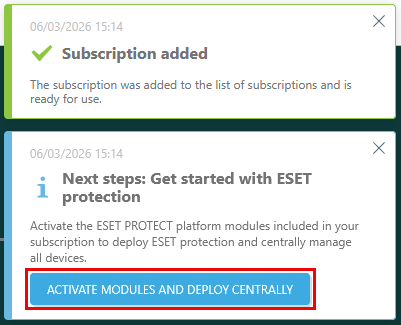
1.After you add a subscription or generate a trial subscription for ESET PROTECT Advanced, a notification Next steps: Get started with ESET protection will appear in the screen corner. Click Activate modules and deploy centrally to activate the ESET PROTECT Platform modules included in your subscription.
2.The module activation wizard will display. In Select the modules you want to activate, select the check box next to each module you want to activate. Click Learn more on the module bar to access the module's Online Help. To activate all modules within the added subscription, select the check box next to Select all. Click Continue.
3.In Select a data center to activate modules, ESET PROTECT Hub selects the recommended remote data center for you by default. To shorten the setup process of future ESET PROTECT Platform module activations, select the check box next to Remember selected data center for future ESET PROTECT platform module activations.
|
•Choosing a non-recommended data center can affect the quality of service. •You cannot change the data center's location after the module activation. |

4.In the Select language section, you can select a language for the activated platform modules. By default, the language you have selected as your ESET PROTECT Hub account language is pre-selected for the platform modules. If your ESET PROTECT Hub language is not available for the platform modules, English is pre-selected by default. To change the pre-selected language, select a language from the language drop-down menu for each platform module.
5.Review your selections and click Activate to activate ESET PROTECT Platform modules.
Add subscriptions to sites
You can assign your newly created subscriptions to sites and distribute their subscription unit quantity directly in the Sites section.
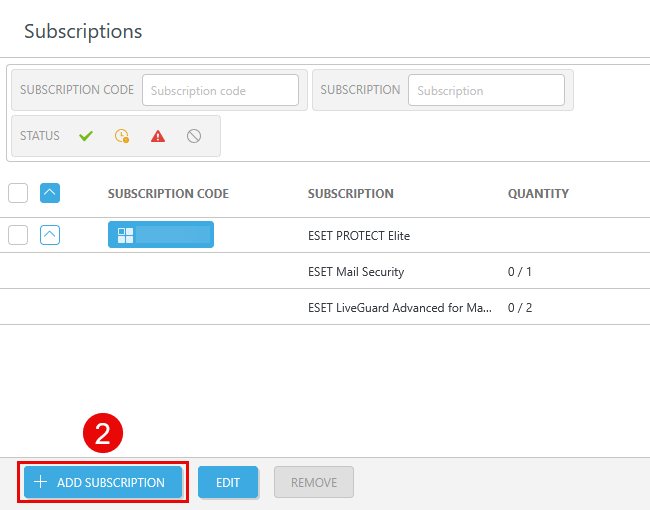
1.Go to Sites. Click the three dots  icon next to the site > Show subscriptions.
2.Click Add subscription.
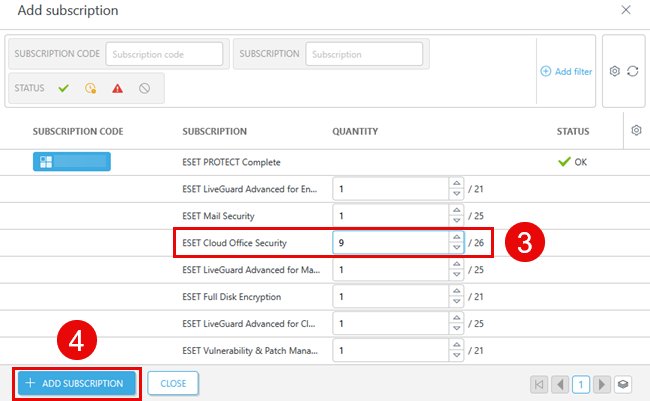
3.Select your solution, and add the desired subscription unit quantity in the Quantity column.
4.Click Add subscription.