
IoC search
IoC search enables users to search for IoC (Indicators of Compromise) types, such as Botnet, C&C, Domain, File, IP, and URL in the ESET Threat Intelligence database. The data is deduplicated, and the data retention period is 90 days.
|
IoC search is now available as a preview feature. The rate limit is 300 searches per customer per week, and the search results limit is 100 per IoC type. |

The IoC search feature provides two options:
•Simple search—Enables users to input a single value without specific syntax and search across all topics
•Advanced search (Botnet, C&C, Domain, File, IP, URL)—Enables users to define multiple search criteria and use logical operators to narrow the search results more precisely within a specific topic
Simple search
To use the simple search, select it from the topic drop-down menu and type the search query in the search field. Input values for the simple search include the following:
•Hash (MD5, SHA-1, SHA-256)
•URL
•Domain name
•IP address
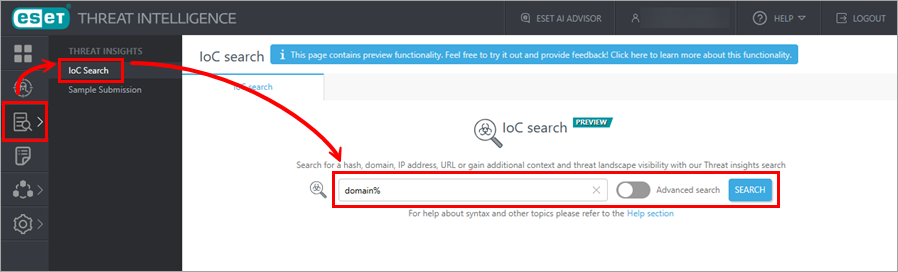
You can also use the wildcard string modifier—%. A wildcard acts as a placeholder for one or more characters and can match part of a string. You can use it to search for patterns instead of exact matches when the exact value is unknown or only partially known, for example, %example.com.
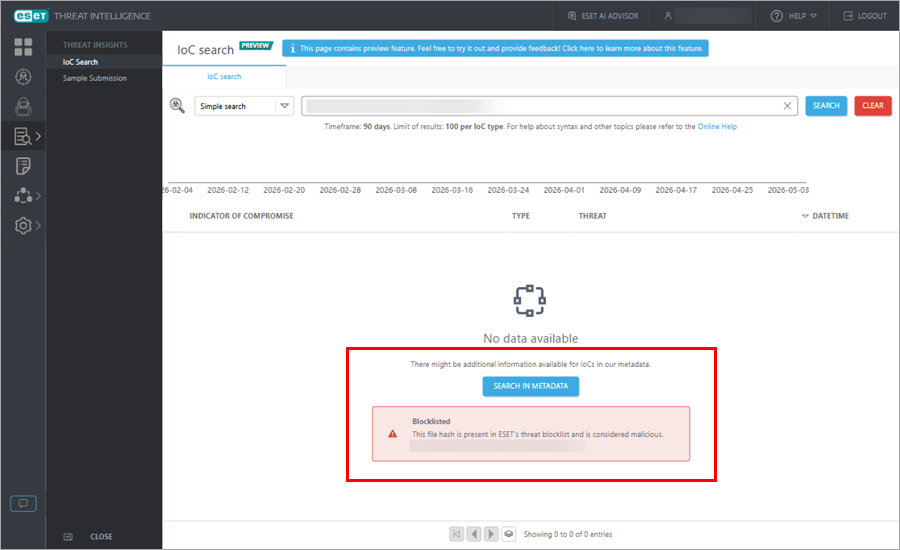
If the simple search does not return any results from the ESET Threat Intelligence database, the system displays results from Reputation services. Additionally, the Search in Metadata feature, which enables the search for the IoC information in ESET Threat Intelligence metadata, is available.
|
Results from Reputation services are not available for MD5 hash searches. |
Advanced search
To use the advanced search, select the topic to search within (Botnet, C&C, Domain, File, IP, URL). Place the cursor in the search field to see the list of fields available for search within the selected topic and type the search query. Additionally, refer to the list of fields for the advanced IoC search shown in the table.
You can combine multiple conditions using operators and modifiers in the advanced search input query.
Operators for the advanced search
•:—Equality operator, for example, field:value
Modifiers for the advanced search
•Dates:
od/w/m/y—Supported intervals, where: d—days, w—weeks, m—months, y—years
o-—Lower than, for example, 3d-—lower than three days before
o+—Greater than, for example, 1d+—greater than one day before
•Integers:
o-—Lower than, for example, 100-—lower than 100
o+—Greater than, for example, 10+—greater than 10
You can also use the wildcard string modifier (%) in the advanced search.
The example of the advanced search syntax is: last_seen:1d+ confidence:High count:10+.
|
Advanced IoC search restrictions •Each field can only be used once in the search input. •Each search condition is connected by the logical operator AND. |
Using the IoC search
To use the IoC search, follow these steps:
1.Navigate to Threat Insights > IoC Search.
2.Select either the simple search or the advanced search within one of the topics (Botnet, C&C, Domain, File, IP, URL).
3.Type the search query into the search field.
4.Click the Search button.
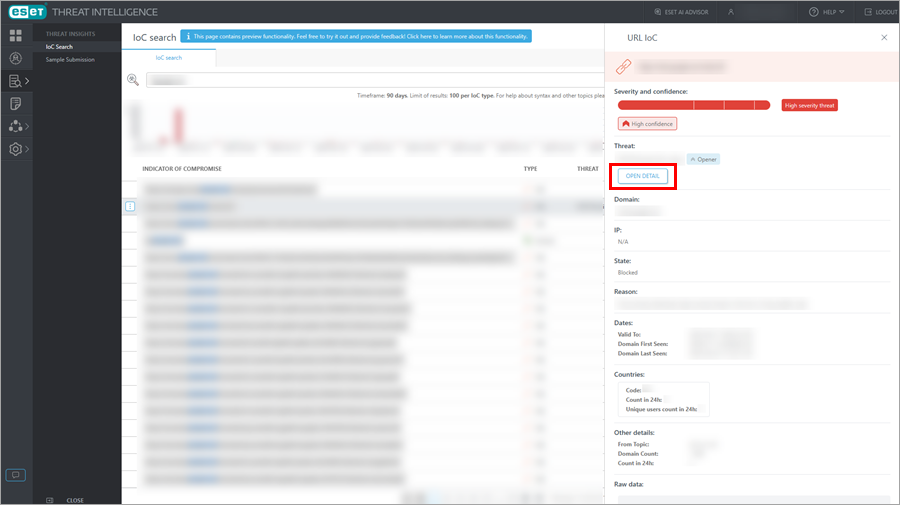
5.Review the search results, including useful statistical data below the search bar. To get more information about a specific IoC from the search result, click the IoC of your interest and see the details in the opened side panel. If the IoC additionally contains a Threat name, you can see detailed information about the threat by clicking the Open Detail button in the side panel.
6.To clear the search results, click the Clear button next to the search bar.
Suggestions
This section contains suggested queries for your reference. You can use them as examples to try the advanced search:
1.Click the query of your interest to populate it in the search field.
2.Click Search.
3.View the search results according to your search query.
History
This section displays the queries you have used for previous searches. You can add frequently used queries to favorites by clicking the star icon.
Fields for the advanced IoC search
Field name |
Topic |
Data type |
Description |
Enumeration |
|---|---|---|---|---|
cnc |
C&C |
string |
URL of the Command and Control server |
|
cncs.last_alive |
Botnet |
date |
Last time the Command and Control server was confirmed active |
|
cncs.url |
Botnet |
string |
URL of the Command and Control server |
|
confidence |
Domain IP URL |
string |
Confidence level of the indicator |
•High •Medium •Low |
count |
Domain File |
integer |
Total number of detections or occurrences |
|
count_24h |
Domain URL |
integer |
Number of detections in the last 24 hours |
|
countries.code |
Domain URL |
string |
ISO country code where the threat was observed |
|
countries.count |
File |
integer |
Number of detections per country |
|
countries.count_24h |
Domain URL |
integer |
Number of detections per country in the last 24 hours |
|
countries.country |
File |
string |
Full country name where the threat was observed |
|
countries.region |
File |
string |
Geographic region where the threat was observed |
|
countries.unique_users_count_24h |
Domain URL |
integer |
Number of unique affected users per country in the last 24 hours |
|
direction |
IP |
string |
Network traffic direction |
•Incoming •Outgoing |
domain |
Domain URL |
string |
Domain name |
|
domain_count |
C&C URL |
integer |
Total number of times the domain was seen |
|
domain_first_seen |
C&C URL |
date |
The time at which the domain was first seen |
|
domain_last_seen |
C&C URL |
date |
The time at which the domain was last seen |
|
downloaded_detection |
Domain URL |
string |
Detection name for the file that was downloaded from the given URL |
|
file.count |
Botnet |
integer |
Number of files associated with the indicator |
|
file.file_name |
Botnet |
string |
Name of the malicious file within a botnet entry |
|
file.file_type |
Botnet |
string |
MIME type or format of the file within a botnet entry |
|
file.first_seen |
Botnet |
date |
The time at which the file was first seen |
|
file.md5 |
Botnet |
string |
MD5 hash of the file |
|
file.sha1 |
Botnet |
string |
SHA-1 hash of the file |
|
file.sha256 |
Botnet |
string |
SHA-256 hash of the file |
|
file.size |
Botnet |
integer |
Size of the file in bytes |
|
file.ssdeep |
Botnet |
string |
Fuzzy hash (ssdeep) of the file |
|
file_name |
File |
string |
Name of the malicious file within a file group entry |
|
file_type |
File |
string |
MIME type or format of the file within a file group entry |
|
first_seen |
Domain File |
date |
The time at which the indicator was first seen |
|
host |
C&C |
string |
Hostname of the Command and Control server |
|
ip |
C&C Domain IP URL |
string |
IP address |
|
last_alive |
C&C |
date |
Last time the Command and Control server was confirmed active |
|
last_seen |
Domain |
date |
The time at which the indicator was last seen |
|
location |
Domain IP |
string |
Geographic location (country/region) of the IP |
|
md5 |
File |
string |
MD5 hash of the file |
|
opener_detection |
Domain URL |
string |
Detection name for the file that tried to access the given URL |
|
port |
C&C IP |
string |
Network port used by the threat |
|
prot_l4 |
C&C |
string |
Layer four transport protocol of the C&C connection (TCP/UDP) |
|
prot_l7 |
C&C |
string |
Layer seven application protocol (HTTP/HTTPS) |
|
protocol |
IP |
string |
Network protocol used by a malicious IP |
|
reason |
Domain IP URL |
string |
Reason for classification as malicious |
•Host actively distributes high-severity threat in the form of executable code. •Host is known source of phishing or other fraudulent content. •Host is known source of active fraudulent content. •Host is known to be actively distributing adware or other medium-risk software. •Host actively distributes high-severity threat in the form of malicious code. •Host is known to be actively distributing threats or is of uncertain reputation. •Host is known to be distributing low-risk and potentially unwanted content. •Host is used as command and control server. •Host is known to be actively distributing high-severity mobile threats or low-risk software. •Host actively distributes potentially unwanted or unsafe threat. •Web services scanning and attacks •SMB bruteforce IP •RDP bruteforce IP •MySQL bruteforce IP •SQL bruteforce IP •FTP bruteforce IP •Host actively distributes high-severity threat in the form of script code. •Host is known for abusing search engine optimization features to distribute unwanted content and spam. |
sha1 |
File |
string |
SHA-1 hash of the file |
|
sha256 |
File |
string |
SHA-256 hash of the file |
|
size |
File |
integer |
Size of the file in bytes |
|
ssdeep |
File |
string |
Fuzzy hash (ssdeep) of the file |
|
state |
C&C Domain IP URL |
string |
Classification state of the indicator |
•Blocked •Phishing •Unwanted •BlockedObject |
subtopic |
File URL |
string |
Specific subcategory or feed topic of the IoC |
For the File topic: •puaadware •malicious-files •emailattachments •androidthreats •androidinfostealer •ransomware •puadualapps For the URL topic: •urls •phishingurl •scamurl •cryptoscam •smishing •smscam |
targets |
Botnet |
string |
Targeted entity |
|
threat |
Botnet C&C File |
string |
Threat name or malware family |
|
url |
URL |
string |
URL |
|
urls |
IP |
string |
Array of URLs associated with the threat |
|
valid_to |
Botnet C&C Domain File IP URL |
date |
Date until which the indicator is considered valid |
|