Requests
The  Requests section displays requests and request statuses. The Requests section of the ESET PROTECT Hub main menu displays a counter showing the total number of requests that are pending approval.
Request statuses
|
Pending approval |
|
Approved |
|
Rejected |
|
Canceled |
|
Expired |


To add filtering criteria, click Add Filter and select a filter type from the the drop-down menu or type the search string and press Enter. Active filters are highlighted in blue. See Using ESET PROTECT Hub for more details on managing filter presets and adjusting the main table view.
Click the three dots  icon or select a request, click Actions and select an action depending on your access:
•Show details—View the request information.
•Resend—Resend an expired request.
•Accept—Approve a pending request.
•Reject—Reject a pending request.
•Cancel—Cancel a pending request.
•Remove—Remove a request.
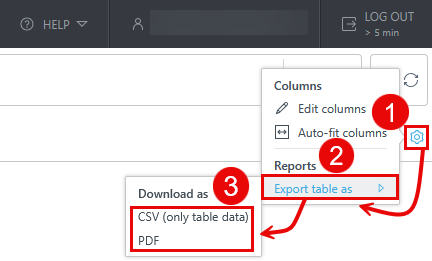
Export the Requests table
You can export the table as CSV (only table data) or PDF:
1.Click the gear  icon in the main table header.
2.Select Export table as.
3.Click the desired format.