Audit logs
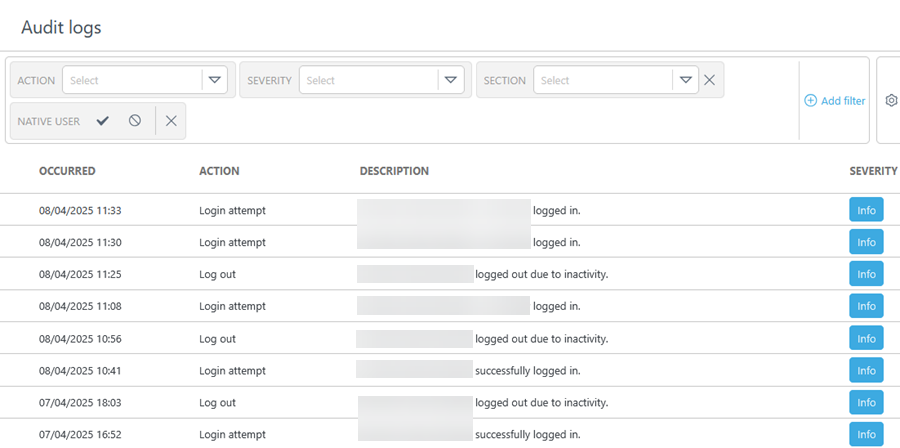
The  Audit logs section provides a detailed record of user actions and system events within ESET PROTECT Hub. Audit logs track changes, monitor activity and ensure accountability.
Each audit log entry shows:
•Occured—Timestamp of the occurrence.
•Action—The logged action or event.
•Description—Details about the action or event.
•Severity—The severity type of the action. There are three severity types:
 Information
 Warning
 Alert
Alert
•Results—Outcome of the action.
•User—The user who performed the action.
•Impersonated user (if applicable)—The user impersonated during the action.
•User type—Users are labelled as native (created in ESET PROTECT Hub) or non-native (imported from an external system).
•IP address—IP address of the user responsible for the action.
•Section—Section of ESET PROTECT Hub where the action occurred.
Use the Action drop-down menu to filter log entries by type, event severity or time of occurrence.
|
The Action drop-down menu is only available to the superuser. |
To add filtering criteria, click Add Filter and select a filter type from the the drop-down menu or type the search string and press Enter. Active filters are highlighted in blue. See Using ESET PROTECT Hub for more details on managing filter presets and adjusting the main table view.
Impersonation
Distributors and MSP Managers can impersonate subordinate accounts. The impersonated user activity is logged in Audit logs. To filter out impersonation logs, select the User Impersonation check box.
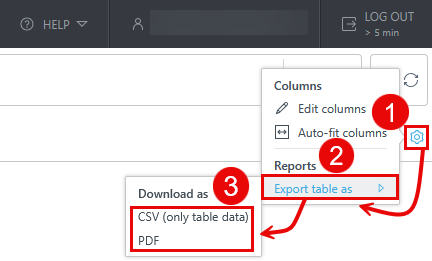
Export the Audit logs table
You can export the table as CSV (only table data) or PDF:
1.Click the gear  icon in the main table header.
2.Select Export table as.
3.Click the desired format.