Active units
The  Active units section shows all subscription units that are currently in use and count toward your total subscription capacity. Each active subscription represents one ESET solution activated for an asset.
ESET PROTECT Hub lists active subscription units based on your account and displays them according to the selected filters. The Grand total row displays the total number of used subscription units based on the applied filters. It is calculated based on usage and may differ from the total number of subscription units displayed in the Active units table.
Use filters at the top of the screen to filter by:
•Unit name
•Subscription code
•Solution
•Site
•Active since
•Inactive since
•Managed remotely
•Offline
To add filtering criteria, click Add Filter and select a filter type from the the drop-down menu or type the search string and press Enter. Active filters are highlighted in blue. See Using ESET PROTECT Hub for more details on managing filter presets and adjusting the main table view.
Move a unit to a site
To move an active subscription unit to a site:
1.Click the unit.
2.Select Move to site.
3.Select a site from the list.
4.Click Move.
|
Move a remotely managed unit to a site The Move to site action is not available for units that are managed remotely via ESET PROTECT. Remotely managed units display Yes in the Managed remotely column of the To assign a remotely managed unit to a site, re-activate the unit by running the Product Activation task in ESET PROTECT, and select the appropriate |

 site subscription in the task
 Rename a unit
To rename a unit:
1.Click the three dots  icon next to the active unit.
2.Select Rename.
3.Type a new name in the Change unit name dialog box.
4.Click Save.
Release a unit
To release a subscription unit:
1.Click the unit.
2.Select Release subscription unit.
3.Click Release in the Release subscription unit dialog box.
|
If you release a unit: •The active subscription unit will be released and become available to use again. •The solution activated for the asset associated with this unit will no longer receive updates. •You must uninstall your solution from the asset. •You can use the freed-up subscription unit to activate a solution for another asset. |

Deploy protection
Click Deploy protection to deploy and manage ESET solutions. You can deploy and manage ESET solutions via ESET PROTECT or ESET PROTECT On-Prem. Download installer to deploy and set up ESET business solutions on assets not managed by ESET PROTECT.
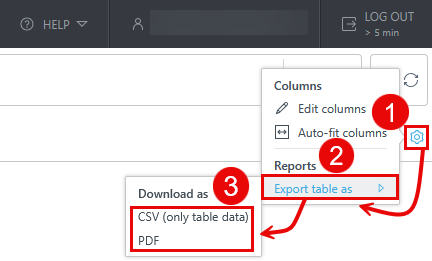
Export the Active units table
You can export the table as CSV (only table data) or PDF:
1.Click the gear  icon in the main table header.
2.Select Export table as.
3.Click the desired format.