
MISP
The ESET Malware Information Sharing Platform (MISP) server contains IoCs described in the reports. Every time a new report is available, the administrator receives an email notification. Historical reports are also available.
Integration, automation and interaction with ESET APT MISP
Access ESET APT MISP from the ESET Threat Intelligence Portal > APT Reports > Access APT MISP.
Based on the ESET Threat Intelligence MISP access model that uses read-only accounts, we recommend using the MISP API for easier integration and automation. MISP API offers a simple way for integration and automation tasks.
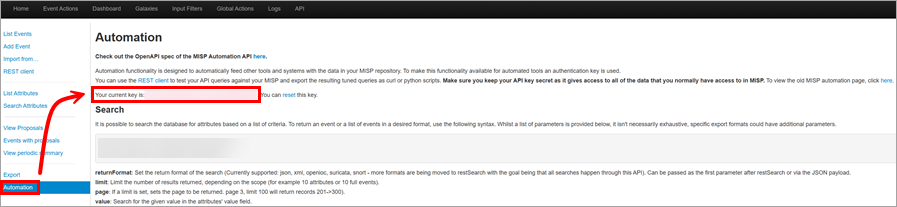
To use automation, ensure you have your MISP API key. You can find your MISP API key on the ESET Malware Information Sharing Platform > Automation:
Basic MISP API usage examples
Download a specific event:
$ curl --header "Authorization: YOUR API KEY" \ --header "Accept: application/json" \ --header "Content-Type: application/json" \ https://misp.eset.com/events/view/<EventID> |
Download all events:
$ curl --header "Authorization: YOUR API KEY" \ --header "Accept: application/json" \ --header "Content-Type: application/json" \ https://misp.eset.com/events/ |
Upload events to the target MISP:
$ curl --request POST https://<TARGET MISP>/events/ \ --header "Accept: application/json" \ --header "Content-Type: application/json" \ --header "Authorization: YOUR API KEY" \ --include \ --data "@event.json" |
To simplify usage of the MISP API, consider utilizing the PyMISP Python library, PyMISP Python library on GitHub or ESET Threat Intelligence examples of common queries, which are inspired by the PyMISP documentation and examples.
Also, there are scripts to help you interact with ESET MISP, such as:
•YARA extractor—enables you to retrieve YARA rules from reports published on MISP and utilize these rules in their system
•Threat Actor's Region extractor—enables you to retrieve the region of the Threat Actor from reports published on MISP
You can find the scripts, their usage examples, and information about common queries on GitHub.
Reports in MISP
The reports in MISP are accessible by the ETI (ESET Threat Intelligence) Portal download link (PDF) and ETI Portal Report UUID. The ETI Portal download link (PDF) and ETI Portal Report UUID are provided as object attributes of the MISP Event. Refer to the example below.
•ETI Portal Report ID:
"type": "other" "category": "External analysis" "comment": "ETI Portal Report ID" "value": ETI Portal Report ID in the format of UUID, for example, "1351b9c3-b176-4de3-9234-2fe03c2913d5" |
•ETI Portal download link (PDF):
"type": "other" "category": "External analysis" "comment": "ETI Portal download link (PDF)" "value": ETI Portal download link to PDF, for example, "https://eti.eset.com/reports/apt/download/1351b9c3-b176-4de3-9234-2fe03c2913d5" |
ETI Portal Report ID
ETI Portal Report ID can be used with the ESET Threat Intelligence APIv2.
The ESET Threat Intelligence API documentation (Swagger/OpenAPI) is available through the provided link. To use the ESET Threat Intelligence API, you must have the ESET Threat Intelligence Portal API credentials generated.
For the APT (Advanced Persistent Threat) report download link (PDF), use the https://eti.eset.com/api/v2/apt-reports/{reportUuid}/files endpoint. Alternatively, you can use the direct API download link: https://eti.eset.com/api/v2/apt-reports/{reportUuid}/download/pdf.
ETI Portal download link (PDF)
The ETI Portal download link (PDF) directs to the ESET Threat Intelligence Portal UI, which requires authentication using your ESET Business Account/ESET PROTECT Hub login credentials. MISP UI and ESET Threat Intelligence Portal UI users can use the link to download PDFs in the browser.
JSON
Below is an example of a MISP Event in JSON format.
{ "Event": { "id": "189", "info": "TA-2022-0029 APT35 - Sponsoring New Access", "Object": [ { "id": "31040", "name": "report", "meta-category": "misc", "description": "Report object to describe a report along with its metadata.", "template_uuid": "70a68471-df22-4e3f-aa1a-5a3be19f82df", "template_version": "8", "event_id": "189", "uuid": "267fbc00-82ac-4f63-a231-67276f1673a8", "timestamp": "1730846965", "distribution": "5", "sharing_group_id": "0", "comment": "", "deleted": false, "first_seen": null, "last_seen": null, "ObjectReference": [], "Attribute": [ { "id": "162578", "type": "other", "category": "External analysis", "to_ids": false, "uuid": "9897f9a5-9fb8-4cc4-91d3-4043529bc695", "event_id": "189", "distribution": "5", "timestamp": "1730846959", "comment": "ETI Portal Report ID", "sharing_group_id": "0", "deleted": false, "disable_correlation": false, "object_id": "31040", "object_relation": "title", "first_seen": null, "last_seen": null, "value": "1351b9c3-b176-4de3-9234-2fe03c2913d5", "Galaxy": [], "ShadowAttribute": [] }, { "id": "162579", "type": "link", "category": "External analysis", "to_ids": false, "uuid": "293a1f2b-402f-4a79-bcc2-b43e6950c5f5", "event_id": "189", "distribution": "5", "timestamp": "1730846965", "comment": "ETI Portal download link (PDF)", "sharing_group_id": "0", "deleted": false, "disable_correlation": false, "object_id": "31040", "object_relation": "link", "first_seen": null, "last_seen": null, "value": "https://eti.eset.com/reports/apt/download/1351b9c3-b176-4de3-9234-2fe03c2913d5", "Galaxy": [], "ShadowAttribute": [] } ] } ] } } |