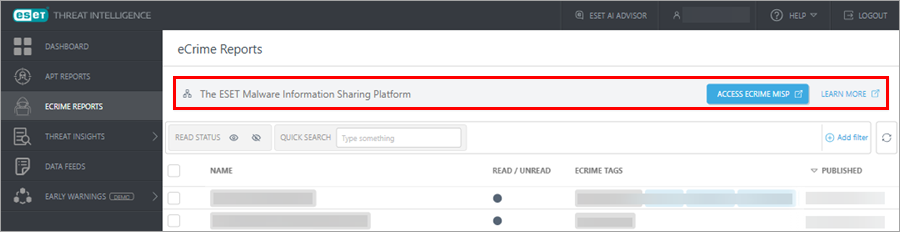
eCrime Reports
The eCrime Reports screen displays all the eCrime reports available for the currently logged-in user.
The eCrime reports focus on ransomware and infostealer intelligence. The reports include:
•Analysis of attackers and their tactics
•Analysis of relationships between campaigns and TTPs (Tactics, Techniques, and Procedures)
•Region-specific telemetry
•More precise threat prioritization through real incident analysis
•Actionable defense recommendations tied to real breaches
Activity summary (monthly)
Activity summary reports provide an overview of the latest cybercriminal campaigns. They summarize complex threat activity into clear, strategic insights. Activity summary reports focus on ransomware and infostealers, including threat indicators, practical recommendations, and guidance to improve resilience. In general, activity summaries offer a concise, intelligence-driven snapshot of the threat landscape.
Technical analysis (quarterly)
Technical analysis delivers actionable insights into real-world cyberattacks by a specific threat actor. It describes how threats unfold and how to defend against them. Technical analysis includes a comprehensive compromise chain analysis, detailing the attacker's tactics, tools, infrastructure, and timelines. They also provide attacker profiles mapped to MITRE ATT&CK techniques and curated IoCs (Indicators of Compromise), so defenders know how attacks operate and how to respond to them.
Monthly digest (monthly)
The Monthly digest provides an overview of recent ransomware and infostealer activity. It highlights key trends, notable incidents, and emerging threats. The Monthly digest enables leadership to stay informed, assess risk exposure, and align cybersecurity priorities.
The reports are sorted by:
•Name—The name of the report
•Read/Unread—The Read/Unread status of the report
•Published—The date and time when the report was published
Click Add filter to filter the displayed reports with custom filter parameters.
Using the Reports screen
Click the three dots  icon next to the report to display the following options:
•Show report detail—Display details about the selected report
•Download results—Download the report results in PDF
•Mark report—Select the option:
oMark as read—Mark the selected report as read if it is unread
oMark as unread—Mark the selected report as unread if it is read
•Copy direct link—Copy the direct link to the report
To mark reports as read/unread in bulk, select several reports, click the Actions button and select the needed option.
Access eCrime MISP
To access the eCrime ESET Malware Information Sharing Platform, click the Access eCrime MISP button.