
Audit Log
View, filter and export a list of plugin-related events performed on managed devices. See audit log details collected by the plugin for the selected managed device.
Click the Refresh  icon to update the list with the most up-to-date data. (Optional) Select the check box next to Auto refresh for automatic update of the data.
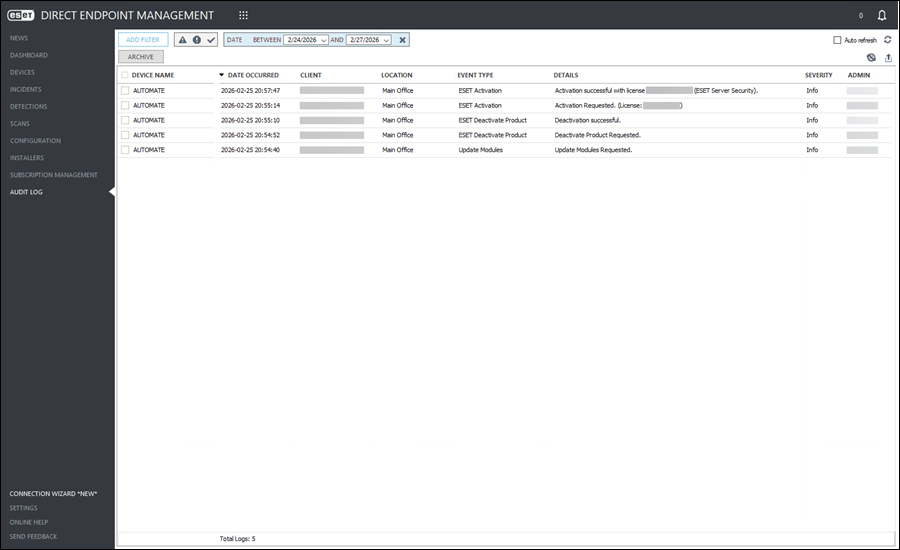
Audit log details
Right-click the row with the desired managed device. The following options are available:
Device name |
|
|
Device details collected by the plugin for the managed device. |
|
Open ConnectWise Automate Computer Management Screen. |


Show device details
•Overview—Displays all available database information from the plugin for the selected managed device. Click Tasks for the list of available actions.
•Detections—Displays list of detections from the last seven days for the selected managed device.
•Scans—Displays list of scans from the last seven days performed on the selected managed device.
•Events—Displays list of plugin-related events from the last seven days performed on the selected managed device.
•Policies—Displays list of assigned policies for the the selected managed device.
Filter table data
To filter data, click Add Filter and select the applicable value from the drop-down menu.
Various filters allow editing, for example, the Date, Client, Location, etc. Adjust the filters using the appropriate drop-down menu or type the value.
Click the x next to the filter to remove it.
Available filters:
•Client
•Location
•Device Name
•Event Type
•Archived
•Date
Filter by severity
Click a Severity icon— Critical,
  Warning or
  Info. You can combine these icons by enabling or disabling them.
Sort table data
All tables can be filtered and sorted by any column. To easily sort by ascending/descending order, select the applicable column header. For additional filters and sorting options, right-click the column header.
Group table data
In the desired table column, right-click and select Group By This Column. All items will be grouped by the selected column header.
Click the Clear Column Grouping  icon to remove any table column grouping.
Archive table data
Select the check box next to the desired row and click Archive to set the event as archived.
To view the archived event, add the filter Archived and select the check box in the filter.
To unarchive an archived event, select the desired row with the archived entry and click Unarchive.
Export table data
To export the filtered table data, click the Export Table  icon, and in the next window, type the File Name. Click Save to create the export file in the .csv format.