
ESET Vulnerability & Patch Management
|
You need the following access rights to edit the ESET Vulnerability & Patch Management part: •Use access—Subscriptions •Use access—Policies •Write access—Product Activation Client Task MSP users need Use access to the All static group or to at least one company in their group tree. If you do not have the required access rights, the ESET Vulnerability & Patch Management part is disabled. |

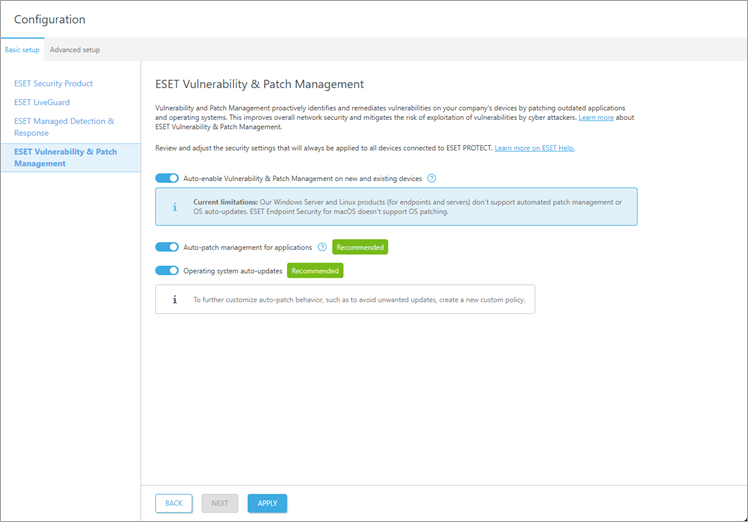
The wizard prompts you to adjust security settings:
|
The settings are marked as Not applied if they are not applied yet. |
1.Select Auto-enable Vulnerability & Patch Management on new and existing devices to enable ESET Vulnerability & Patch Management on new and existing devices that do not have it enabled yet. If this option is not selected; it does not deactivate ESET Vulnerability & Patch Management on devices where it is already active, it only stops automatic enablement.
2.If Auto-enable Vulnerability & Patch Management on new and existing devices is selected, you can enable Auto-patch management for applications and Operating system auto-updates.
|
Following applications do not support auto-patch management and OS auto-update: •ESET Server Security for Microsoft Windows Server version 11.0+ •ESET Mail Security for Microsoft Exchange Server 11.0+ •ESET Security for Microsoft SharePoint Server 11.0+ •ESET Endpoint Antivirus for Linux version 11.0+ •ESET Server Security for Linux version 11.0+ ESET Endpoint Security for macOS version 8.0+ does not support OS patching. |

3.Click Apply to apply security settings or Next to continue with the next module.
Disable settings
You can disable the settings with the toggle  .
.