
MSP subscriptions
Eligible accounts
To enable the MSP features in ESET PROTECT On-Prem, you need to import your MSP account in ESET PROTECT On-Prem Subscription Management.
•You can import following types of ESET MSP Administrator accounts: MSP, Managed MSP and MSP Manager.
•Any account needs to have at least read permission to at least one company, which can be its parent company or one customer.
•Access to the parent company is not required.
•The distributor account cannot be imported.
Information on subscriptions and companies
•Subscriptions imported from your MSP account are tagged with the company name. If the company is renamed later, the tags are not renamed automatically. You can edit them manually.
•All subscriptions are imported in a way compatible with the ESET PROTECT On-Prem security model. Each user created using the MSP Customer setup can only see and use their subscriptions.
•If there is a company in your MSP structure which has no subscriptions by the time of synchronization, that company is synchronized only to the computer MSP Tree, not to the MSP Tree inside Subscription Management.
•If you add a new company in ESET MSP Administrator, ESET PROTECT On-Prem adds the company to the MSP tree after the next subscription synchronization.
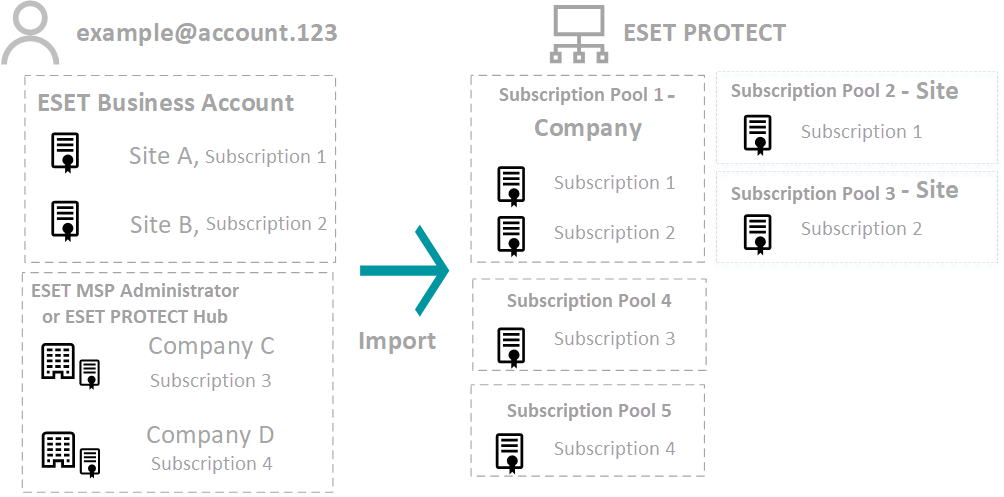
•Subscriptions from ESET MSP Administrator are divided into one pool for each company. You cannot move a subscription out of the pool.
•You can find company names and sites in the Subscription User column in the Subscription Management. You can use the Subscription User data when creating a report.
•If you have subscriptions both in ESET Business Account and ESET MSP Administrator under the same credentials, ESET PROTECT On-Prem synchronizes all subscriptions from both accounts. All ESET Business Account subscriptions are saved in multiple subscription pools. Subscriptions from ESET MSP Administrator are divided into one pool for each company. ESET PROTECT On-Prem supports ESET Business Account Sites for splitting subscriptions.
•When removing any subscription pool, you automatically remove all other subscription pools associated with the same account. Read more about how to remove a company.
On-demand synchronization
The ESET PROTECT On-Prem synchronizes with the activation servers once a day. If you have made changes in your MSP account and you want to update the subscription screen and MSP tree, navigate to Subscription Management > Actions and click Synchronize Subscriptions.