
Removing a company
The MSP tree is synchronized with the MSP account. You need to remove the MSP account from the Subscription Management to unlock the MSP tree. When you remove the account, all companies managed by that account are unlinked from the MSP tree.
|
If you stop managing a company, remove ESET Management Agents from that company computers. You cannot remove the company from the MSP tree without removing the whole MSP account from your subscription management. The MSP static group is persistent. After you synchronize the MSP tree, you can never remove the MSP root group, only its child groups. |

Removing the MSP account and companies from the MSP tree
1.Log in to ESET PROTECT Web Console and navigate to More > Subscription Management.
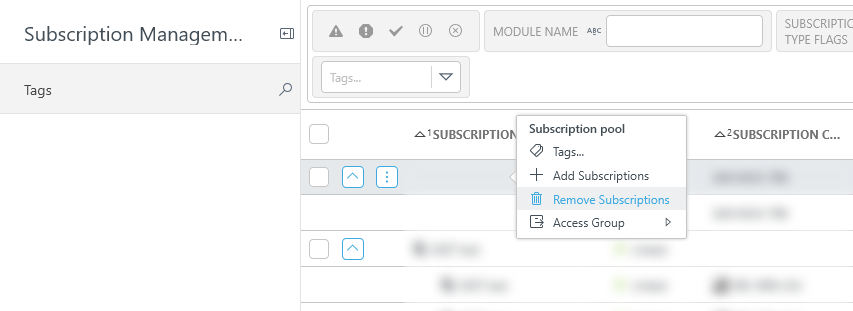
2.Click the subscription you want to remove > Remove Subscriptions. Keep in mind, that if you remove any subscription linked to an MSP account, the whole account and its linked subscriptions are removed from ESET PROTECT On-Prem.
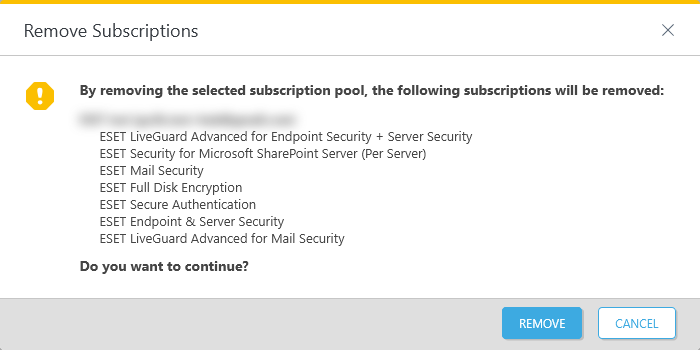
3.Confirm your choice to remove (unlink) the listed subscriptions from the Subscription Management.
|
When removing any subscription pool, you automatically remove all other subscription pools associated with the same account. For example, Company X subscriptions were imported using credentials of joe@test.me from ESET MSP Administrator. If a user removes subscriptions of the Company X, all the subscriptions imported from joe@test.me ESET Business Account and ESET MSP Administrator accounts get removed from the Subscription Management. |

4.Wait a few moments after the action and navigate to the Computers menu.
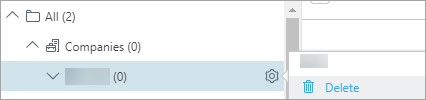
5.The icons of all the removed companies change to  . Now you can click and Delete any company that was previously a part of the MSP Tree. You can only remove a company (its static group) if it is empty.
|
After you remove the MSP account from the Subscription Management, you get the MSP Administrator is not connected status in the Status Overview. You need to remove all groups from your former MSP tree (in the Computers menu) to turn off that status. |
