Display high-level information about your ESET DEM plugin for ConnectWise Automate environment. To display the event count, hover a mouse over a specific part of the chart or graph.
Click the Refresh  icon to update the list with the most up-to-date data. (Optional) Select the check box next to Auto refresh for automatic update of the data.
|

|
Displayed data
•All displayed data in each of the Dashboard view tabs is for currently active managed devices only.
•The displayed time interval is locked to the past seven days and cannot be adjusted.
•Each tab is divided into three or four parts displaying specific information both in graphical or table form. Click the graph  or table or table  icon to change the way the data is displayed. icon to change the way the data is displayed. |
The following tabs are available in the Dashboard view:
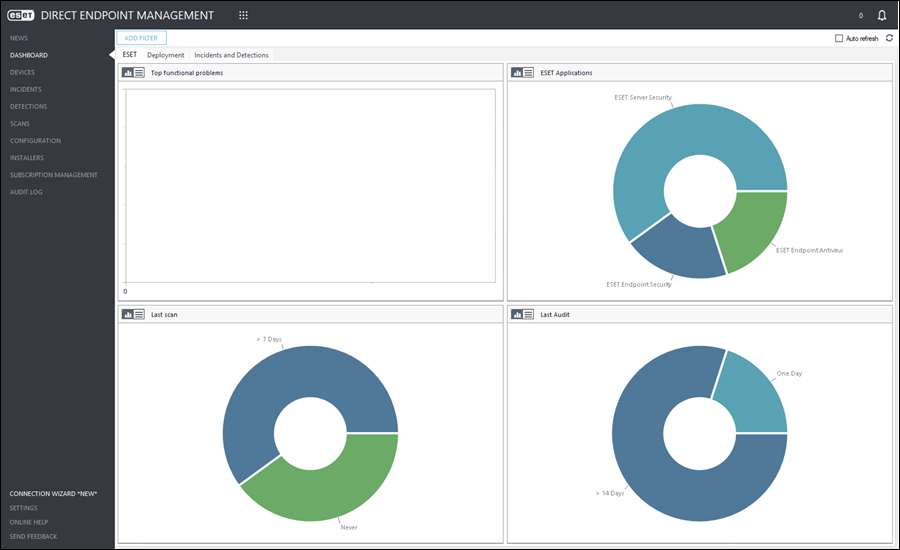
The ESET tab displays ESET endpoint/server security application-related events:
•Top functional problems—Overview of top issues reported by the ESET endpoint/server security applications on managed devices.
•ESET applications—Overview of deployed types of ESET endpoint/server security applications on managed devices.
•Last scan—Overview of elapsed time period since the last ESET endpoint/server security application scan on managed devices.
•Last Audit—Overview of elapsed time period since the last ESET endpoint/server security application plugin audit returned from managed devices. |
The Deployment tab displays both ESET endpoint/server security and ESET encryption applications deployment-related events:
•Deployment results in last 7 days—Overview of successful/failed ESET security/encryption application deployment on managed devices.
•Deployment failure reasons in last 7 days—Overview of error messages for failed deployments on managed devices.
•Pending Deployments (Windows Only)—Overview any pending deployments on (Windows only) managed devices.
•Automatic Deployment Blacklist—Overview of all managed devices assigned to the Automatic Deployment Blacklist, prohibiting automatic deployment. Click Manage to view and edit the blacklist. |
|
|
ESET Endpoint Encryption subscription required
This tab is available in the Dashboard view only after ESET Endpoint Encryption subscription is added or synchronized in the ESET DEM plugin for ConnectWise Automate.
|
The ESET Endpoint Encryption tab displays ESET encryption application-related events:
•ESET Endpoint Encryption Status—Overview of top issues reported by the ESET encryption application on managed devices.
•Last audit—Overview of elapsed time period since the last ESET encryption application plugin audit returned from managed devices.
•Event Log Errors and Warnings—Overview of ESET encryption application error and warning messages on managed devices. |
The Incidents and Detections tab displays ESET endpoint/server security and ESET encryption applications-related events:
•Incident status—Overview of high/medium/low severity incidents by count.
•Top 10 computers with detections in last 7 days—Overview of top ten managed devices with detections in the last seven days.
•Detection by severity in last 7 days—Overview detections by severity on managed devices in the last seven days.
•Top detections in last 7 days—Overview of top detection types on managed devices in the last seven days. |
Filter table data
To filter data, click Add Filter and select the applicable value from the drop-down menu.
Adjust the filters using the appropriate drop-down menu or type the value.
Click the x next to the filter to remove it.
Available filters:
•Client
•Location

 ESET
ESET