Automatic updates of ESET security applications
ESET PROTECT On-Prem includes a feature to keep ESET security applications updated to the latest version on your managed computers.
Automatic application updates are automatically enabled on a new ESET PROTECT On-Prem installation.
|
•You must have an eligible ESET security application to use the Auto-updates feature. See the list of ESET business applications that support automatic updates. Other ESET security applications do not support automatic updates and ESET will add this feature to them in the future. •You can configure automatic updates via a Policy. •See also Auto-updates FAQ. The first automatic update will happen when a future version of the initially released 9.x build is released (for example, 9.1 or 9.0.xxxx.y, where xxxx is later than the first 9.x build). To ensure maximum update stability, automatic application updates have a gradual rollout and a delayed distribution after the global release of a new ESET security application version. The update is rolled out per endpoint individually, and it may take from a few weeks to 1–2 months for the update to become available for all other endpoints. In the meantime, the Web Console may report the ESET security application as outdated. Right after the build release, the update is only offered to devices with the Immediate auto-updates policy setting or when running the update on demand. •If auto-updates for the whole network take a long time, you can enforce the upgrade with the Check For Application Update task. •Before upgrading the ESET security application, ensure: oThe operating system has the most recent updates installed. oThere are no pending Windows updates or restarts. •See also What are the different ESET application update and release types? •The auto-updates do not work if you use an offline repository that does not contain the metadata (for example, if you copied installers onto a shared network drive). Use the Mirror Tool to create an offline repository that supports auto-updates. The Mirror Tool offline repository distributes the auto-updates simultaneously across the whole network (an online repository distributes the auto-updates gradually). |

|
Follow one of the options below to upgrade ESET security applications in your network to a version that supports automatic updates: •Use the one-click action in Dashboard > Status Overview > Component version status: Click the blue/yellow/red bar representing outdated components or applications and select Update installed ESET applications to initiate an update. •In Computers, click the gear icon next to the All Static Group and select Tasks > Update > Update ESET applications. •Use the Software Install Client Task. |

There are two ways to upgrade ESET security applications to the latest version:
•Auto-updates feature
Differences between Software Install Client Task and the Auto-updates feature:
Upgrade process |
Restart after upgrade |
Future upgrades |
|
|---|---|---|---|
Software Install Client Task |
The upgrade process includes ESET security application reinstallation. |
ESET security application upgrade requires an immediate computer restart for security reasons (to ensure full functionality of the upgraded ESET security application). |
Manual—Administrator must start each future upgrade by running the Software Install Client Task—see the available options above. |
Auto-updates |
The upgrade process does not include ESET security application reinstallation. |
ESET application upgrade requires a computer restart, but not immediately (the restart is not enforced). ESET PROTECT On-Prem administrator can enforce computer upgrade and restart remotely from the Web Console using the Shutdown Computer Client Task with the selected Reboot computer(s) check box. |
Automatic—Automatic updates of supported ESET security applications when a new version is released (the update is delayed for stability reasons). You can manually enforce checking for ESET security application upgrades using the Check For Application Update Task. |
Legal documentation update
ESET PROTECT Web Console notifies the administrator if an updated legal documentation for ESET PROTECT On-Prem or managed ESET modules is available.
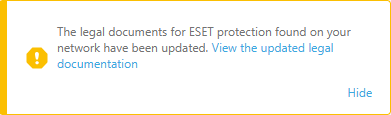
Click View the updated legal documentation to see the details or Hide to move the notification under a yellow bell icon in the upper toolbar.

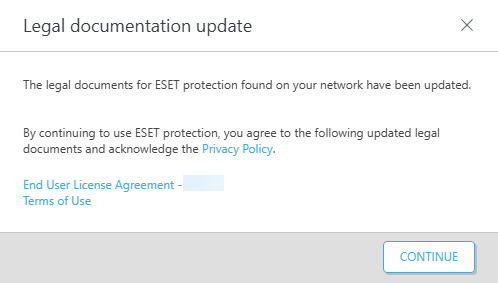
When you click View the updated legal documentation, a new window appears with details about legal documentation changes:
•If you have earlier versions of ESET applications that do not support automatic updates (for example, ESET endpoint 8.x and earlier), click Accept to accept the updated legal documents and enable the upgrade to a version that supports automatic updates.

•If you have ESET business applications that support automatic updates (for example, ESET endpoint version 9 and later), you get a notification about the updated legal documents, but you do not need to accept it (the Accept button is not available) to update ESET applications to later versions.