
Check For Application Update
The Check For Application Update task enforces checking ESET application upgrades (auto-updates) on managed computers:
|
The supported ESET applications: •ESET Endpoint Antivirus/Security for Windows version 10.1 and later •ESET Server Security for Microsoft Windows Server version 11.0 and later |

•If a later version of the ESET application is available, it is downloaded.
•ESET application upgrade requires a computer restart, but not immediately (the restart is not enforced). ESET PROTECT On-Prem administrator can enforce computer upgrade and restart remotely from the Web Console using the Shutdown Computer Client Task with the selected Reboot computer(s) check box.
•The earlier ESET application remains fully functional until the restart. The upgrade takes place after the next computer restart.
Select one of the following options to create a new Client Task:
•Click Tasks > Add >  Client Task.
•Click Tasks > select the desired task type and click Add > Client Task.
•Click the target device in Computers and select  Tasks > New Task.
Basic
In the Basic section, type basic information about the task, such as a Name and Description (optional). Click Select tags to assign tags.
In the Task drop-down menu, select the task type you want to create and configure. If you have selected a specific task type before creating a new task, Task is pre-selected based on your previous choice. Task (see the list of all Tasks) defines the settings and the behavior for the task.
Settings
|
Settings are not available for this task. |
Summary
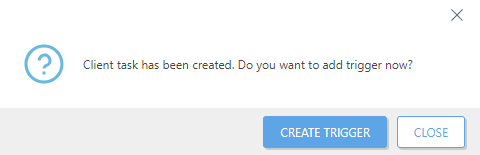
Review the summary of configured settings and click Finish. The Client Task is now created, and a small window will open:
•Click Create Trigger (recommended) to specify Client Task Targets (computers or groups) and the Trigger.
•If you click Close, you can create a Trigger later—Click the Client Task and select  Run on from the drop-down menu.
You can see the progress indicator bar, status icon and details for each created task in Tasks.