
Component installation on Windows
|
We recommend using the ESET PROTECT All-in-one installation on Windows. |

Many installation scenarios require you to install different ESET PROTECT components on different machines to accommodate network architectures, meet performance requirements, or for other reasons. The following installation packages are available for individual ESET PROTECT Windows components:
Core components |
Download links |
Installation instructions |
|---|---|---|
ESET PROTECT Server |
||
ESET PROTECT Web Console |
Install Web Console using the All-in-one installer—Windows (recommended) |
|
ESET Management Agent |
agent_x64.msi (64-bit) agent_x86.msi (32-bit) agent_arm64.msi (ARM) |
|
Database server |
Optional components |
Download links |
Installation instructions |
|---|---|---|
ESET Bridge (HTTP proxy) |
||
Mirror Tool |
||
ESET Rogue Detection Sensor |
rdsensor_x64.msi (64-bit) rdsensor_x86.msi (32-bit) |
Custom installation scenarios include:
•Installation with Custom certificates
•Installation on a Failover Cluster
For instructions to upgrade earlier ESET PROTECT On-Prem to the latest ESET PROTECT On-Prem 13.0, see the upgrade procedures.
|
ESET PROTECT Mobile Device Management/Connector (MDM/MDC) component (on-premises only) reached End of Life in January 2024. ESET PROTECT On-Prem versions 11.1 and later do not support mobile device management. |

If you want to run the installation in your local language, you need to start the MSI installer of a specific ESET PROTECT component via the command line.
Below is an example of how to run the installation in the Slovak language:
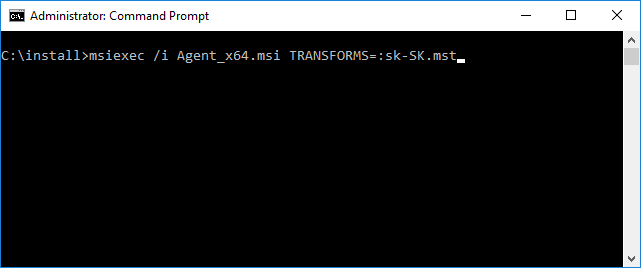
To select the language you want to run the installer in, specify the corresponding TRANSFORMS parameter according to this table:
Language |
Code |
|---|---|
English (United States) |
en-US |
Arabic (Egypt) |
ar-EG |
Chinese Simplified |
zh-CN |
Chinese Traditional |
zh-TW |
Croatian (Croatia) |
hr-HR |
Czech (Czech Republic) |
cs-CZ |
French (France) |
fr-FR |
French (Canada) |
fr-CA |
German (Germany) |
de-DE |
Greek (Greece) |
el-GR |
Hungarian (Hungary)* |
hu-HU |
Indonesian (Indonesia)* |
id-ID |
Italian (Italy) |
it-IT |
Japanese (Japan) |
ja-JP |
Korean (Korea) |
ko-KR |
Polish (Poland) |
pl-PL |
Portuguese (Brazil) |
pt-BR |
Russian (Russia) |
ru-RU |
Spanish (Chile) |
es-CL |
Spanish (Spain) |
es-ES |
Slovak (Slovakia) |
sk-SK |
Turkish (Turkey) |
tr-TR |
Ukrainian (Ukraine) |
uk-UA |
* Only the application is available in this language; Online Help is not available.