
Potentially unsafe applications
There are many legitimate programs whose function is to simplify the administration of networked computers. However, they may be misused for malicious purposes in the wrong hands. ESET provides the option to detect such applications.
Potentially unsafe applications is the classification used for commercial, legitimate software. This classification includes programs such as remote access tools, password-cracking applications, and keyloggers (a program that records each keystroke a user types).
ESET product settings
Users of ESET software can enable or disable detection of these types of applications, view logs and exclude specific files.
To enable or disable the overall detection, follow these instructions:
2.Press the F5 key to access Advanced setup.
3.Click Protections.
4.Select settings next to Potentially unsafe applications according to your preferences (Default value: Off).
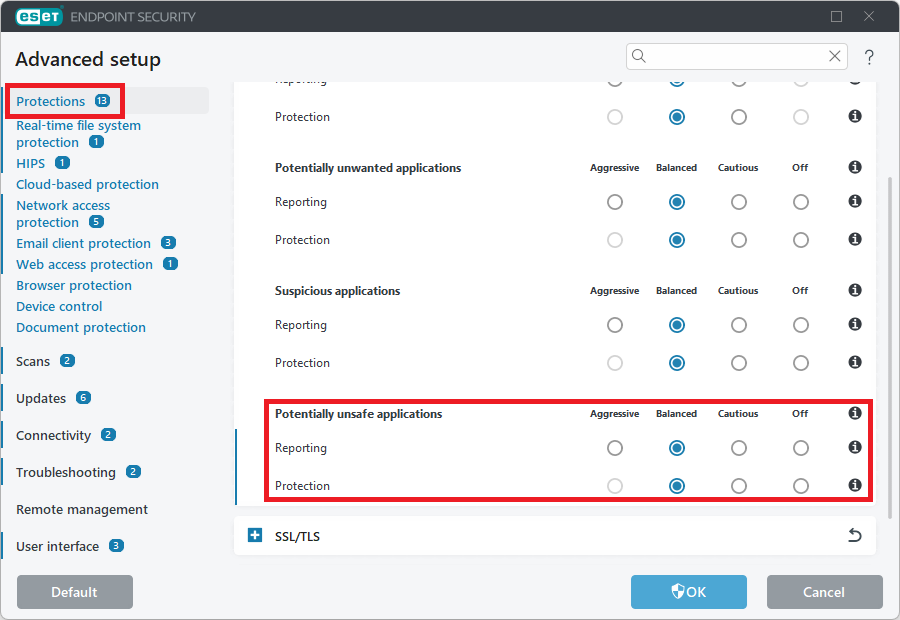
5.Click OK to save your changes.