
Internet protection
Internet connectivity is a standard feature in a personal device. Unfortunately, it has also become the main medium for transferring malicious code. Open the main program window > Setup > Internet protection to configure features in ESET Small Business Security that increase your internet protection.
To pause or disable individual protection modules, click the toggle  icon.
icon.
|
Turning off protection modules may decrease the protection level of your device. |

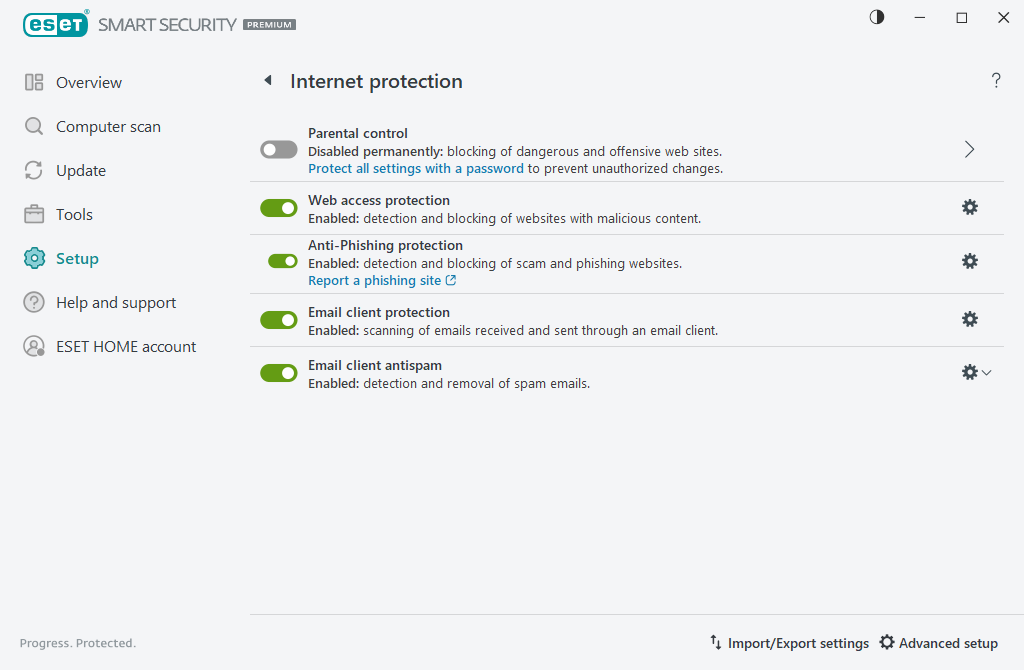
Click the gear wheel  icon next to a protection module to access advanced settings for that module.
Web access protection scans HTTP/HTTPS communication for malware and phishing. Web access protection should only be turned off for troubleshooting.
Web control module enables you to configure settings that provide administrators with automated tools to help protect their workstations and set restrictions for internet browsing. The Web control functionality prevents access to pages with inappropriate or harmful content. Refer to Web control for more information.
Anti-Phishing protection enables you to block web pages known to distribute phishing content. We strongly recommend that you leave Anti-Phishing enabled.
Report a phishing site—Report a phishing/malicious website to ESET for analysis.
|
Before submitting a website to ESET, make sure it meets one or more of the following criteria: •The website is not detected at all. •The website is incorrectly detected as a threat. In this case, you can Report an incorrectly blocked page. |

Email client protection provides control of email communications received through the POP3(S) and IMAP(S) protocols. Using the plugin program for your email client, ESET Small Business Security provides control of all communications from/to the email client.
Email client antispam filters unsolicited email messages.
For the Emal client antispam, click the gear wheel icon and choose from the following options:
•Configure—Opens advanced settings for Email client antispam.
•User's address list (if enabled)—Opens a dialog window where you can add, edit or delete addresses to define the antispam rules. Rules in this list will be applied to the current user.
•Global address list (if enabled)—Opens a dialog window where you can add, edit or delete addresses to define the antispam rules. Rules in this list will be applied to all users.