
Activate ESET Server Security
Activate your application after the installation.
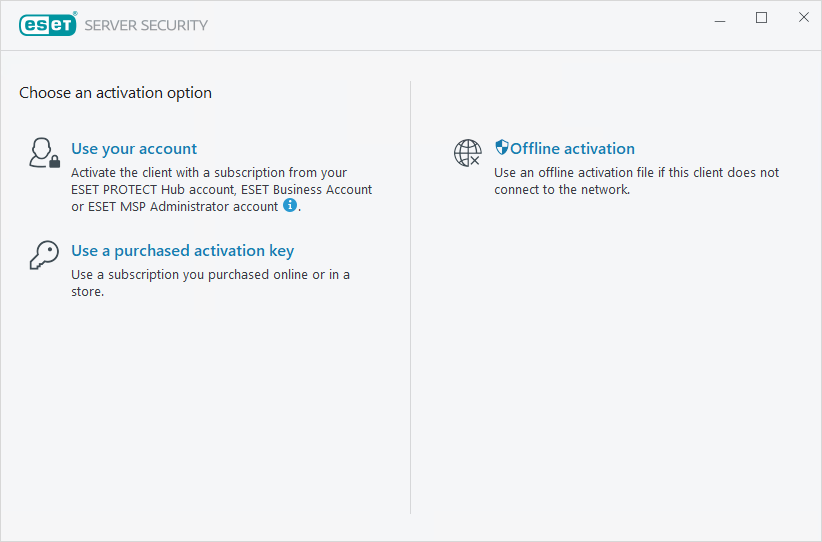
You can use any of the following methods to activate ESET Server Security:
Use your account
Activate the client using your ESET PROTECT Hub account subscription. If ESET PROTECT Hub is unavailable in your country, use the subscription management tools ESET Business Account or ESET MSP Administrator.
A purchased Activation Key
Type or copy/paste your ESET-issued activation key into the Activation Key field and click Continue. Type the activation key exactly as it is, including the hyphens. If you copy/paste the subscription, ensure that you do not accidentally select additional space around the text.
An offline activation file
This is an automatically generated file that is transferred to the ESET application. Your offline activation file is generated from the subscription portal and is used in environments where the application cannot connect to the subscription authority.
Click Activate later with ESET PROTECT if your computer is a member of a managed network, and your administrator will perform remote activation via ESET PROTECT. You can also use this option if you want to activate this client later.
Select Help and support > Change subscription in the main program window to manage your subscription information. You will see the public subscription code used to identify your application and subscription. Your Username, under which the computer is registered, is stored in the About section, and you can view it by right-clicking the Windows notification area  icon.
icon.
After successfully activating ESET Server Security, the main program window opens and displays your current status on the Monitoring page. Some attention may be required initially; for example, you are asked if you want to be part of ESET LiveGrid®.
The main program window also displays notifications about other items, such as system updates (Windows Updates) or detection engine updates. When everything requiring attention is resolved, the monitoring status turns green and displays the status You are protected.
Activate your application from the main menu under Help and support > Activate Product or Monitoring status > Product is not activated.
|
ESET PROTECT can silently activate client computers using subscriptions made available by the administrator. For more information, see the ESET PROTECT Online Help. |
