If you are installing ESET Endpoint Security for the first time, you must allow Full Disk Access to be fully protected.
|

|
Make sure ESET Endpoint Security is activated before you follow the steps to allow full disk access.
|
macOS Sequoia (15) or macOS Tahoe (26)
1.Open System Settings.
2.Select Privacy & Security from the left menu.
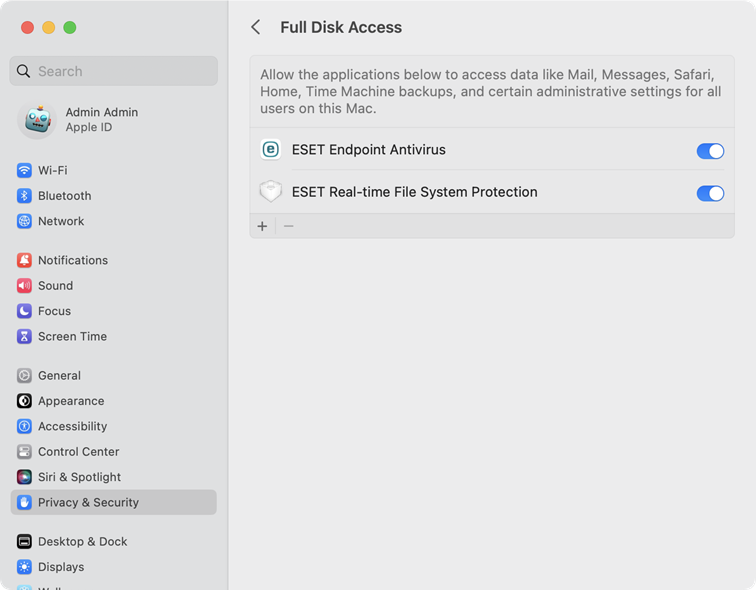
3.Select Full Disk Access.
4.Use the toggle to give ESET Endpoint Security full disk access. Use your Touch ID or click Use Password, type in your Password and click Modify Settings.
5.Use the toggle to give ESET Real-time File System Protection full disk access.
 macOS Ventura (13) or macOS Sonoma (14)
1.Open System Settings.
2.Select Privacy & Security from the menu on the left.
3.Click the Full Disk Access option, and click the ESET Endpoint Security toggle to enable it.
4.Use your Touch ID, or click Use Password, type your User Name and Password and click Unlock.
5.If a restart ESET Endpoint Security prompt displays, click Later.
6.Click the ESET Real-time File System Protection toggle to enable it.
|
macOS Monterey (12) and older
1.Open System Preferences.
2.Navigate to Privacy tab and select Full Disk Access from the menu on the left.
3.Click the lock icon at the bottom left to allow changes in the settings window.
4.Use your Touch ID or click Use Password, type your User Name and Password, then click Unlock.
5.Select ESET Endpoint Security from the list.
6.A restart ESET Endpoint Security notification will display. Click Later.
7.Select ESET Real-time File System Protection from the list.
8.Click Start Again in the alert dialog window to restart ESET Endpoint Security to see your changes, or restart your computer. For more detailed information, visit our Knowledgebase article. |
