
Parental Control Rules
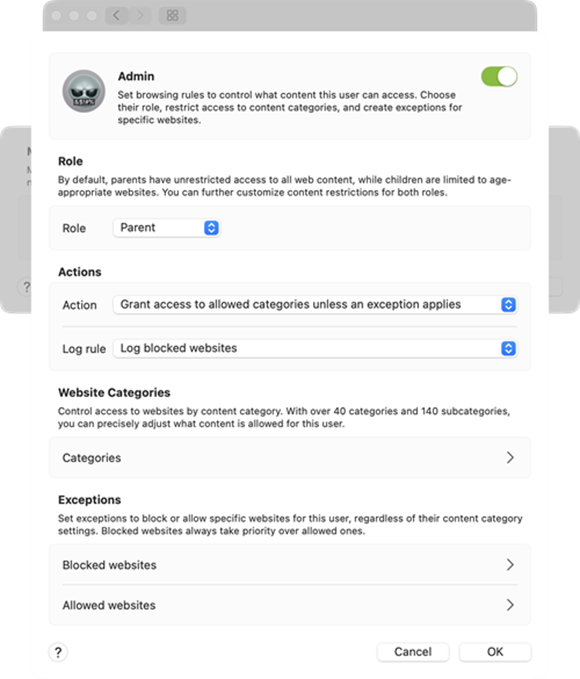
Set browsing rules to control what content this user can access. Choose their role, restrict access to content categories, and create exceptions tor specific websites.
Role
By default, parents have unrestricted access to all web content, while children are limited to age-appropriate websites. You can further customize content restrictions for both roles.
Actions
Action is set by default to Grant access to allowed categories unless an exception applies.
The Log rule setting gives you a choice to either Log blocked websites or Do not log any events.
Website Categories
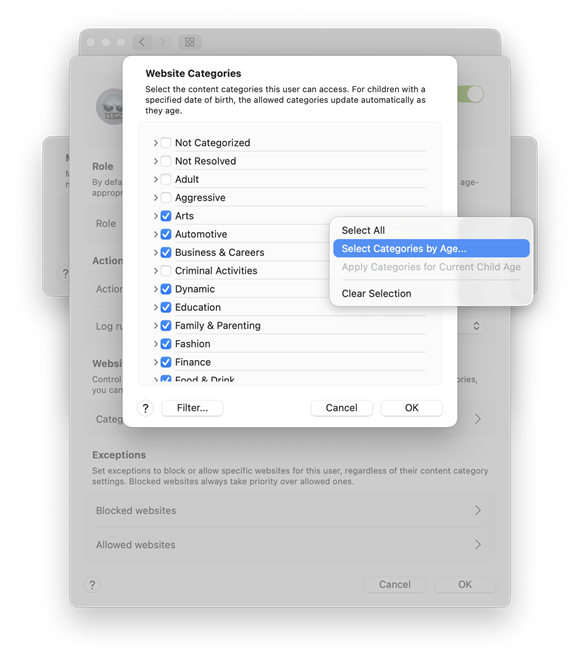
Control access to websites by content category. With over 40 categories and 140 subcategories, you can precisely adjust what content is allowed for each user to access. For children with a specified date of birth, the allowed categories update automatically as they age.
When you right-click on the list of categories you can Select all categories, Select Categories by Age or Apply Categories for Current Child Age.
Click Select Categories by Age, to Allow websites based on age group (Everyone, 12 - 17 years, or 18+ years). Selecting an age group automatically allows content categories appropriate for that age. These settings apply in addition to the categories you have already selected.
Categories can be filtered to see content categories for different age groups without changing user's category settings. By default, the filter matches the user's current age.
Exceptions
Set exceptions to block or allow specific websites for this user, regardless of their content category settings. Blocked websites always take priority over allowed ones.
Blocked websites
Any websites you add here will be blocked for this user, regardless of their content category settings. Special characters like * (asterisk) and ? (question mark) are not allowed. Blocking a domain will block all content on that domain, Including subdomains (for example, sub.examplepage.com).
Allowed websites
Any websites you add here will be allowed for this user, regardless of their content category settings. Special characters like * (asterisk) and ? (question mark) are not allowed. Allowing a domain will grant access to all content on that domain, including subdomains (for example, sub.examplepage.com).