
Upload and manage users via CSV
1.Download the CSV file.
2.Fill out the columns for your users' first_name, last_name, e-mail address and any other applicable information.
3.Save the file to your computer as CSV.
4.Log into ESET CyberCentral Management.
5.Click Targets/Groups > Create Group.
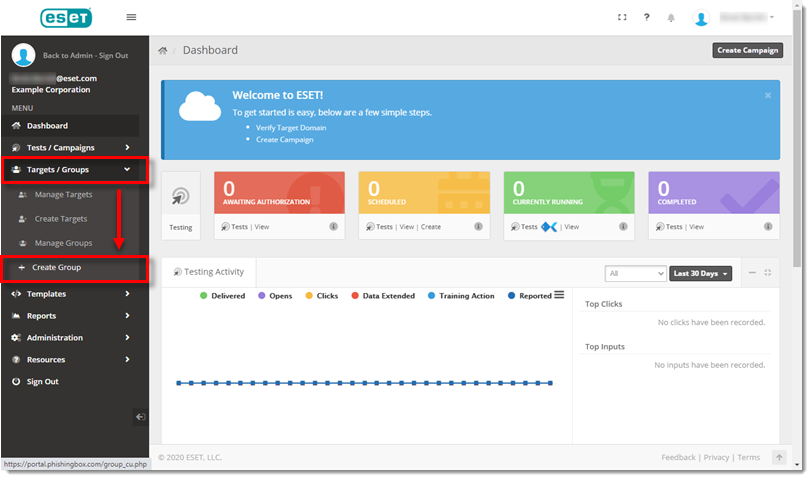
Figure 1-1
6.In the Group Name field, type an applicable name.
7.In the Third-Party Syncing drop-down menu, select CSV and then click Create Group.

Figure 1-2
8.In the Create Targets screen, click Choose File. Select the applicable CSV. Leave the File Contains Header Line check box selected and the other check boxes deselected as this is your first upload. Click Review Import.
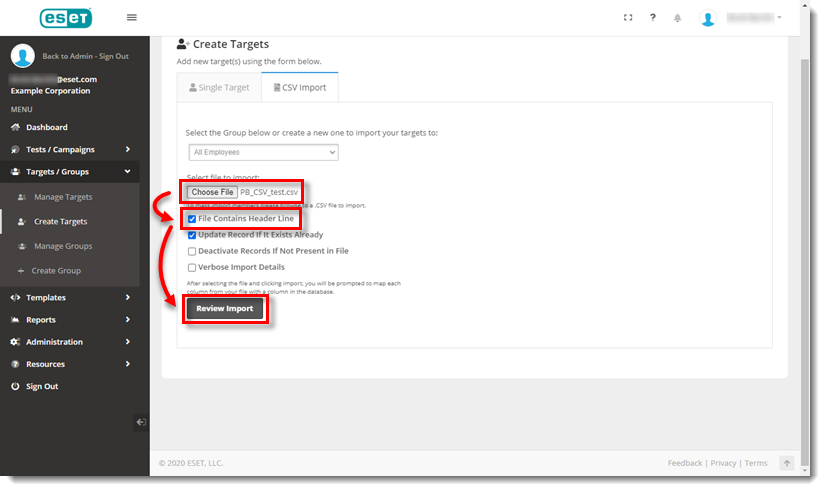
Figure 1-3
9.Make sure the columns are mapped to the correct field. If applicable, add display columns. If you do not want to import certain target fields, select Do Not Import from the applicable column drop-down menu. Click Import Now.
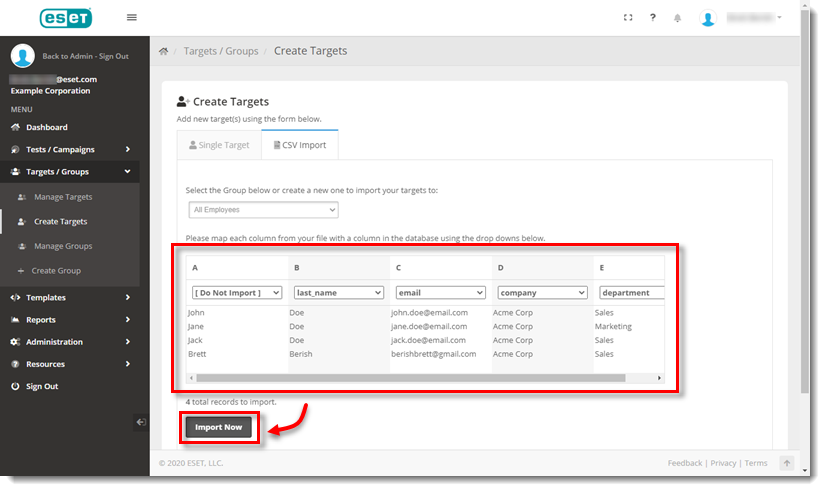
Figure 1-4