
Scheduler
Scheduler manages and launches scheduled tasks according to defined parameters. View all scheduled tasks in a table that shows parameters such as task type and name, trigger details, next run and last run. To create a new scheduled task, click Add task.
To edit an existing scheduled task, click Edit. To revert the list of scheduled tasks to the default settings, click Default, then Revert to default. All changes will be lost and cannot be undone.
There is a set of pre-defined default tasks:
•Log maintenance
•Regular automatic update (use this task to update frequency)
•Automatic update after dial-up connection
•Automatic update after user login
•Automatic startup file check (after user logs in)
•Automatic startup file check (after successful modules update)
•Regular database scan
•Vulnerability & Patch Management device scan—Schedules daily device scan for vulnerabilities and patches.
|
Select the appropriate check boxes to activate or deactivate tasks. |

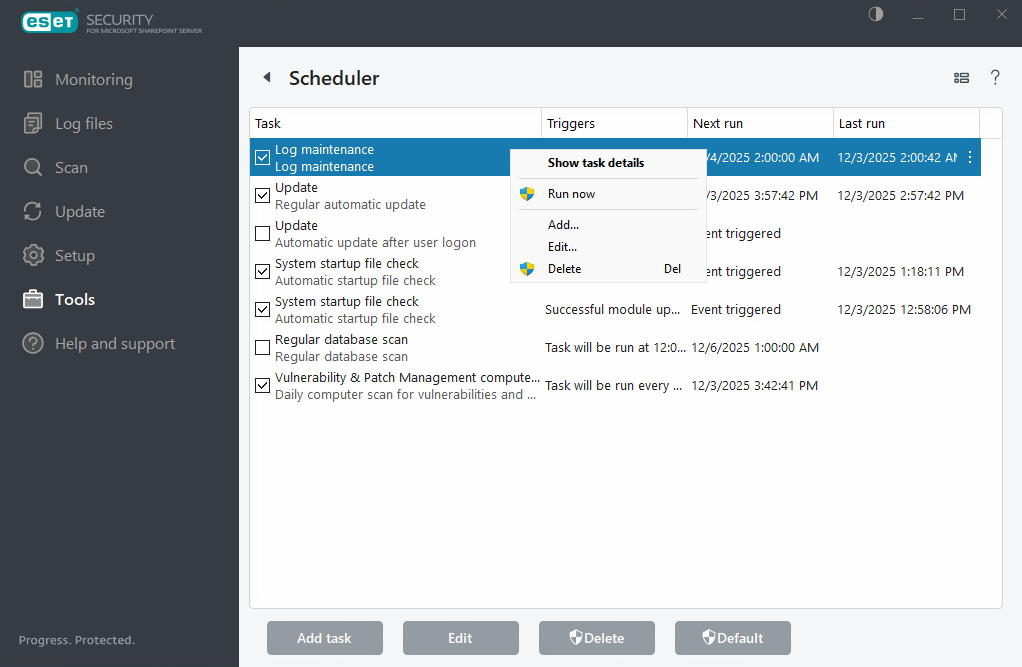
To perform the following actions, right-click a task:
Show task details |
Displays detailed information about a scheduled task when you double-click or right-click the scheduled task. |
|---|---|
Run now |
Runs a selected scheduler task and perform the task immediately. |
Add... |
Launches a wizard that will help you create a new scheduler task. |
Edit... |
Edit the configuration of an existing scheduled task (both default and user-defined). |
Delete |
Deletes an existing task. |
|
If you see unavailable scheduled tasks, it means they are managed by ESET PROTECT. |