
Create API user account
We recommend creating a dedicated API user to separate your regular account from API activities.
Requirements and limitations
•Only the Root or Superuser can create a user with access to API endpoints.
•API access rights cannot be granted to the ESET Business Account Superuser, ESET MSP Administrator 2 Root user, and ESET PROTECT Hub Superuser accounts.
|
A new ESET Business Account cannot be created; an ESET PROTECT Hub account must be created instead. New users can be added to the existing ESET Business Account. |

Create the account
For ESET Business Account and ESET MSP Administrator 2
Follow the steps below to create the dedicated API user account:
1.Log in as a Superuser (or Root) to your ESET Business Account or ESET MSP Administrator 2.
2.Navigate to User management and create a new user with the desired level of access rights. Learn more about user creation and access rights in ESET Business Account and ESET MSP Administrator 2.
3.Enable the toggle next to Integrations under the Access Rights section.
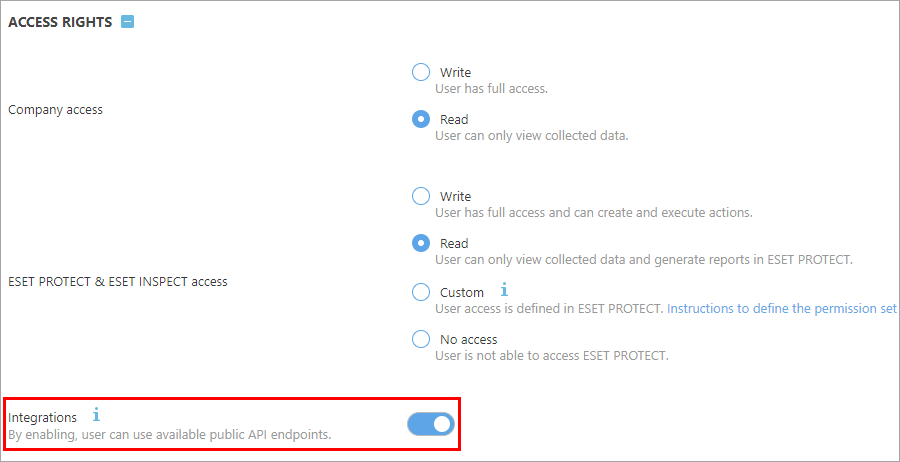
4.Click Create to apply the changes.
5.The new user receives an invitation email and must finish the account creation process.
For ESET PROTECT Hub
Follow the steps below to create the dedicated API user account:
1.Log in as a Superuser to your ESET PROTECT Hub account.
2.Navigate to Users and add a new user.
3.Set the desired level of permissions for the user.
|
If you require custom permissions for the user, assign the required permission sets to this user directly in ESET PROTECT, you can combine several permission sets if needed. Refer to the List of permissions chapter to learn about permission types and functionality privileges in ESET PROTECT, and see the Permission settings chapter to learn about permissions for ESET Inspect. |
4.Enable the toggle next to Integrations under the Permissions section.
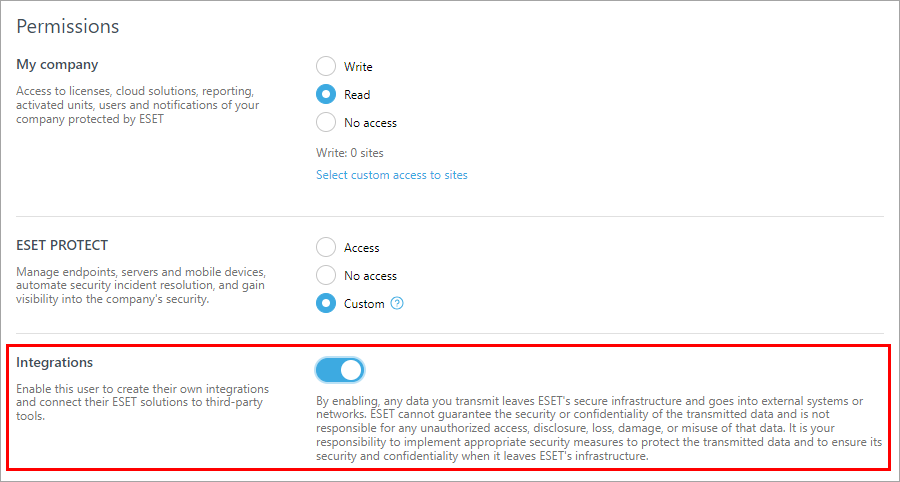
5.Click Next and then click Create to apply the changes.
6.The new user receives an invitation email and must finish the account creation process.
7.The new user must log in to ESET PROTECT Hub at least once before using the API services.