
Category groups
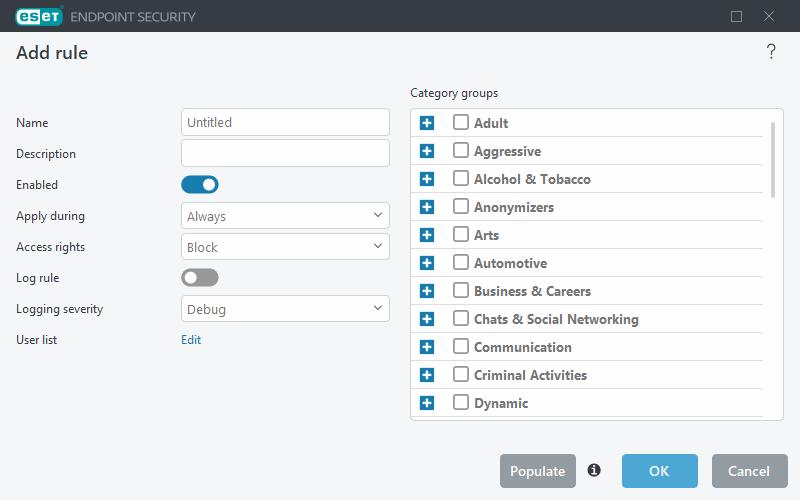
The Category groups window is divided into two parts. The left part of the window contains basic information and parameters of the rule.
Type the name and description of the rule into the field for better identification. Click the Enabled switch to disable or enable the rule; this can be useful if you do not want to permanently delete the rule. Configure other parameters according to your preferences.
The right part of the window contains a list of categories and subcategories. Select a category in the Category list to display its subcategories. Each group contains adult and/or generally inappropriate subcategories as well as categories considered generally acceptable. When you open the Category groups window and for example click the Aggressive group, you can select or deselect categories/subcategories from the list of appropriate groups (for example Violence or Weapons). Web pages with inappropriate content can be blocked and users can be informed when accessing a blocked web page.
Select the check box to add or remove a subcategory to a specific group.
Here are some examples of categories that users might not be familiar with:
- Miscellaneous—Usually private (local) IP addresses such as intranet, 192.168.0.0/16, etc. When you get a 403 or 404 error code, the website will also match this category.
- Not resolved—This category includes web pages that are not resolved because of an error when connecting to the Web control database engine.
- Not categorized—Unknown web pages that are not yet in the Web control database.
- Proxies—Web pages such as anonymizers, redirectors or public proxy servers can be used to obtain (anonymous) access to web pages that are usually prohibited by the Web control filter.
- File sharing—These web pages contain large amounts of data such as photos, videos or e-books. There is a risk that these sites contain potentially offensive material or adult content.
|
You can report a incorrect categorization of an URL. |

|
A subcategory can belong to any group. There are some subcategories that are not included in pre-defined groups (for example, Games). To match a desired subcategory using Web control filter, add it to your desired group. |